IT-Conductor vs. Dynatrace

Observability made simple: Intelligent automation built for enterprise IT

Full-stack observability and intelligent automation — without the complexity. Simple to adopt, simple to operate, simple to scale.
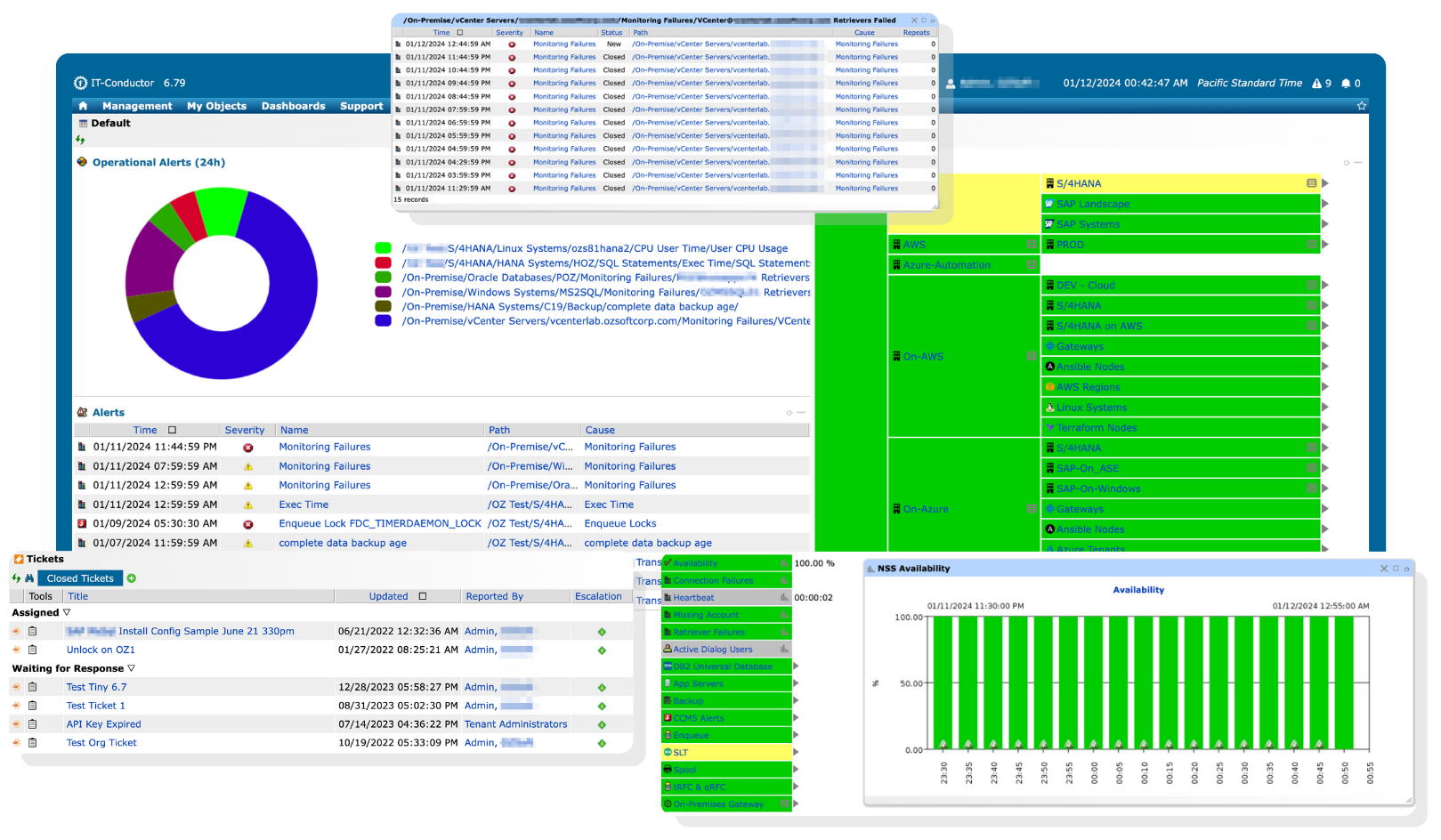
IT-Conductor Default Dashboard

Does Dynatrace cover all your monitoring and automation needs?

Dynatrace combines full-stack observability with AI-powered intelligence and automated workflows, making it appealing to organizations looking for a single platform to monitor and manage all their systems.

Confused AI

Is the platform using AI to reduce noise, or is it just adding more alerts to manage?

While Dynatrace appeals to organizations seeking an all-in-one tool, it can also introduce complexity, exposing multiple technical layers and signals that many teams don’t actually need, generating noise and false alarms for systems that are otherwise healthy, and requiring deep expertise to interpret and maintain. For teams that prioritize clarity, usability, and predictable costs, the platform’s depth and pricing model may outweigh the practical value delivered.

Which solution best supports your business and IT environment?

IT-Conductor provides enterprise-wide observability and end-to-end orchestration in one unified platform. Monitor your entire IT environment without unnecessary complexity and hidden costs.

See how these two solutions compare to determine the right fit for your enterprise.

  • IT-Conductor

  • Dynatrace

IT-Conductor

Starts at $110 /system per month


Flexible pricing for enterprises of all sizes

CONTACT SALES

Dynatrace

Estimated at $29 /host per month


Dynatrace pricing starts low for basic monitoring, but costs rise quickly as you need additional features. The price shown is an estimated baseline for a feature set comparable to IT-Conductor, not the minimum advertised tier.

LEARN MORE
Architecture and Infrastructure Requirements
  • Cloud-based Service Orchestration and Automation Platform (SOAP) designed to monitor, manage, and orchestrate enterprise IT through intelligent automation
  • Agentless monitoring via reverse proxy for connectivity
  • No hardware installation required
  • Full-stack observability platform designed to analyze, automate, and innovate with the power of AI
  • Primarily agentless monitoring with Dynatrace OneAgent installed on every managed host
  • Also supports agent-based monitoring for specific use cases, such as Real User Monitoring (RUM)
Implementation and Deployment
  • Delivered as Software-as-a-Service
  • Works across hybrid/on-prem/cloud
  • Automated landscape discovery with minimal configuration using templates and wizards
  • Requires a Gateway setup to connect to IT-Conductor
  • Delivered as Software-as-a-Service, with a managed on-premises option available
  • Works across hybrid/on-prem/cloud
  • Requires the installation of Dynatrace ActiveGate as a communication proxy between Dynatrace OneAgents and clusters
Performance Metrics and Collection Methods
  • Agentless collection via standard protocols (i.e., SNMP, WMI, JMX, JDBC, and REST APIs), with SAP ABAP metrics collected through standard SAP APIs/RFCs, including CCMS and custom function modules
  • Supports wide SAP landscapes (SAP ABAP (S/4HANA, BW/4HANA, ECC, CRM, BW, SRM, Gateway, SCM, Solman), SAP JAVA (PI/PO, Solman, Portal), BOBJ, BODS, WebDispatcher), and OS/DB components
  • Retrievers determine the method and frequency of metric collection
  • Each metric and alert has an associated class
  • Agent-based collection via Dynatrace OneAgent
  • Supports for custom metrics and extended ingestion methods (i.e., OpenTelemetry, Prometheus, API) for tailored performance insights
  • Agentless collection via JavaScript and integrations using extensions/APIs (e.g., SNMP/REST for infrastructure monitoring) for specific use cases
Availability and Service Monitoring
  • Supports ping, logon, synthetic checks, and URL/HTTP availability monitoring for websites and service endpoints
  • Captures availability even when the managed system is offline through an external heartbeat that monitors from the outside in
  • Context-aware availability monitoring that identifies real outages while filtering minor fluctuations
  • Flexible, customer-defined availability models, including custom checks and threshold parameters
  • Supports end-to-end monitoring for services, business processes, and transactions
  • Supports transaction monitoring to test end-to-end user experience
  • Drill -down capability across hierarchical service layers for root-cause correlation and in-depth analysis
  • Adaptive monitoring that automatically correlates events across layers to reduce alert fatigue
  • Supports ping, logon, synthetic checks, and service status
  • Supports external availability checks via synthetic monitoring, but Dynatrace OneAgent cannot capture data if the host or service is offline
  • AI-powered detection of real outages, filtering out minor fluctuations
  • AI-driven event detection on hosts and reports the availability state of all processes
  • Supports end-to-end monitoring across infrastructure, services, applications, and user experience
  • Supports transaction monitoring with automatic distributed tracing
  • Drill-down capability with automatic dependency mapping and root-cause analysis across services, processes, and hosts
  • AI-driven causal correlation analysis that automatically links anomalies across layers
Thresholds Management
  • Static, dynamic, and standard deviation thresholds with flexible, rule-based targeting
  • Thresholds triggered by aggregates, averages, min/max values, and intervals, with custom severity levels
  • User- or role-based overrides to influence state changes in monitored instances
  • Time-synchronized data with Health Explorer for root-cause analysis (RCA) and troubleshooting
  • Static and auto-adaptive thresholds
  • Thresholds are evaluated over a sliding time window before raising an event to avoid alerting too aggressively on single threshold violations
  • Auto-adaptive baselines continuously learn normal response times, error rates, and load patterns to adjust thresholds as application behavior evolves
  • Aligns time series events with correlated data across monitored systems
Alerts and Notifications Management
  • Advanced, policy-based notifications with dynamic group targeting, schedule- and severity-based delivery
  • Notification channels include email and SMS, with integration to ITSM and team collaboration tools via webhooks and API
  • Supports threshold-based escalations that trigger alerts only when occurrences exceed a set limit
  • Fine-grained alert filtering based on problem severity, duration, tags, and related impact considerations
  • Notification channels include email and SMS, with integration to ITSM and team collaboration tools via webhooks and API
  • Supports user-defined custom alerts that raise metric-threshold events when specific conditions are breached
Automation and Orchestration
  • Intelligent, context-aware recovery actions, designed to automatically remediate known events and recurring issues
  • Cross-platform execution of commands and custom scripts
  • Graphical, interactive process design for creating automated IT and business workflows
  • Resource provisioning and configuration via DevOps workflows and Infrastructure-as-Code (IaC) (i.e., Ansible and Terraform)
  • End-to-end orchestration of complex IT and SAP environments, enabling intelligent automation of monitoring events, recovery actions, and workflows across on-prem and cloud platforms
  • Automated remediation workflows triggered by Davis AI anomaly detection
  • Workflows support event triggers and can execute custom tasks such as API calls and script execution
  • Graphical, no/low-code editor for building automated workflows
  • Integration with Ansible Tower, enabling automated start job templates based on monitoring data
  • Workflows can incorporate Davis CoPilot to summarize issues and generate suggested remediation steps
Reporting and Analytics
  • Interactive, role-based dashboards with KPIs and metrics customized per function
  • Predefined and custom report templates, tailored to specific operational needs
  • Scheduled report generation with automated delivery via multiple channels
  • Supports HTML, PDF, and other export options
  • Historical archiving for baseline comparison, compliance, and troubleshooting
  • Interactive, customizable dashboards with tiles for metrics, logs, and events
  • Notebooks provide a collaborative analytics workspace where teams can visualize and explore data in a shared view
  • Ability to subscribe to dashboard reports and receive updates via email
  • Supports JSON, PDF, and other export options
  • Data retention period depends on data type
Usability and Accessibility
  • Minimal expertise required to get started
  • Web-based access from anywhere
  • Role-based access control for secure permissions
  • Steep learning curve and may require technical familiarity to get the most out of the platform
  • Web-based access from anywhere
  • Mobile access via Dynatrace Mobile App
Support and Documentation
  • Multi-channel support
  • Always-on support for maximum system reliability with expert guidance
  • SLA-based response time for issues and inquiries
  • Onboarding and training sessions to accelerate adoption and proficiency
  • Knowledge base with regular updates
  • Multi-channel support
  • Business hours support available with Standard plans, and 24/7 expert support and SLA-based response times available for Enterprise Success & Support plans
  • Dynatrace ONE onboarding and customer success program to accelerate adoption
  • Knowledge base with regular updates

Stop paying for complexity you don't need

Achieve a holistic view of your applications, services, and IT infrastructure consolidated into one intuitive interface.
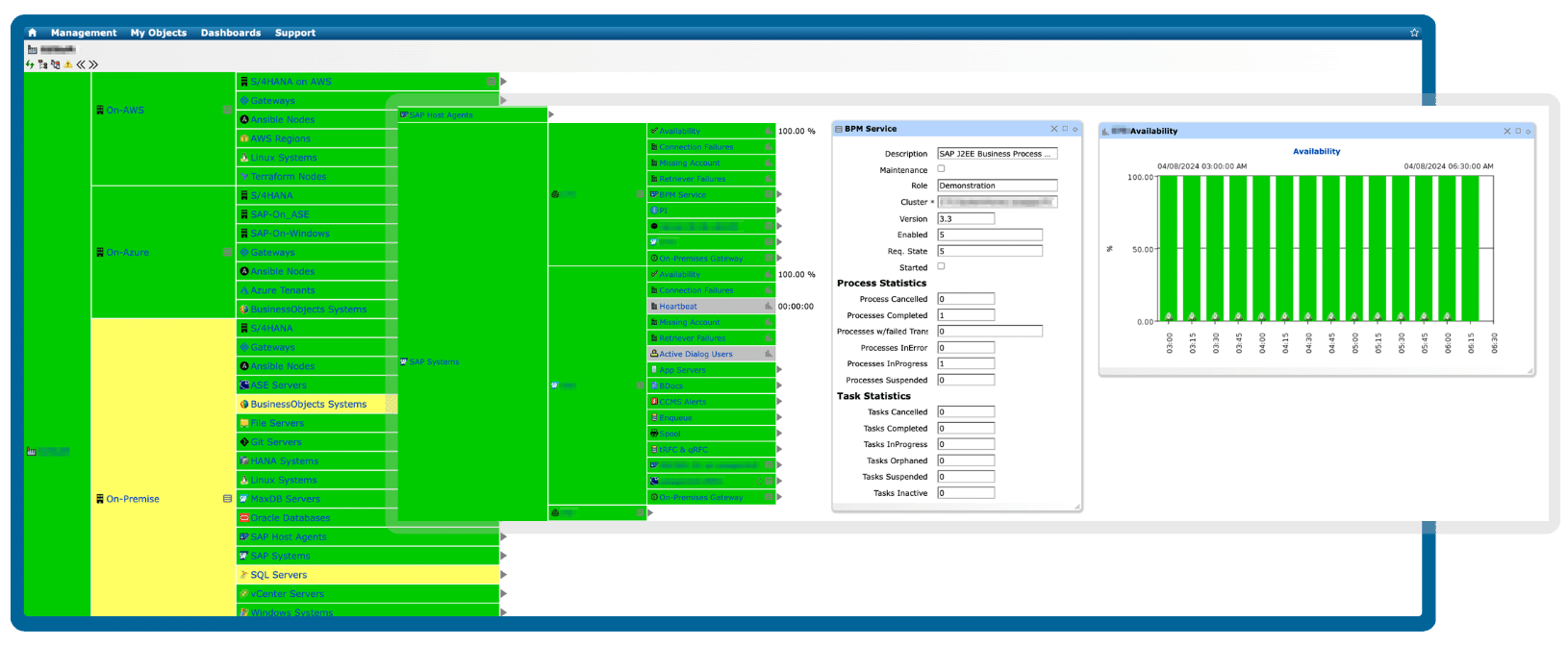
IT-Conductor Service Grid
BROCHURE

Grab this file to review an overview of our solutions at your convenience and share it with your team anytime

Transform your operations with intelligent workflows, proactive monitoring, and robust scalability. By minimizing noise and maximizing performance, your team can focus on strategic initiatives.
TESTIMONIALS

What our customers say

We had the monitoring of our SCM system up and running within a single collaborative web session. The IT-Conductor team was able to capture specific details of long-running jobs and queue failures, which provided actionable short-term fixes, while recommending auto-recoveries for queues that were only possible via manual intervention previously. The manpower saving and quick MTTR that could be realized was obvious, especially when IT-Conductor can automate it 24x7.

As part of Under Armour’s SAP migration to AWS, automation was identified as a top priority to ensure we leverage best practices in standardized deployment and use industry-leading tools to automate SAP IT Operations processes. IT-Conductor fits nicely into the solution mix, being an AWS SaaS Marketplace platform and a deep automation specialist.

FAQs

Need clarification?

Which solution provides enterprise-wide IT monitoring and automation while minimizing the total cost of ownership?

While Dynatrace offers an affordable entry-level pricing for basic monitoring, this approach often falls short for modern, complex tech stacks. With only basic monitoring included, organizations quickly need to add more features to get full coverage, driving up the total cost of ownership (TCO) over time.

IT-Conductor, on the other hand, provides enterprise-wide IT monitoring and automation from the start, delivering upfront value and predictable TCO without hidden costs.

Can I use IT-Conductor with Dynatrace?

Yes. IT-Conductor can work alongside Dynatrace and other existing monitoring tools without conflict. However, direct integration is currently not provided.


Which tool requires less effort to onboard IT environments of varying complexity?

IT-Conductor provides automated discovery and guided onboarding for IT environments of any size or complexity, enabling teams to start monitoring and automating quickly. In comparison, Dynatrace requires agents to be deployed on each monitored system and additional configuration for complete coverage, which can increase onboarding time and operational effort, especially in complex or hybrid environments.

Subscribe to the IT-Conductor Newsletter

Get insights on the latest trends in tech, product updates, and industry perspectives delivered straight to your inbox.