SAP Post-Copy Automation (PCA)

IT-Conductor FLUX™ leverages advanced SAP-native Post Copy Automation (PCA). Unlike traditional solutions that require extensive OS-level access, FLUX operates entirely within the SAPGUI, ensuring seamless integration with your existing SAP environment and compliance with RISE deployments.

Works with

SAP NetWeaver Application Server, SAP S/4HANA Enterprise Management

itconductor-available-on-sap-store    now available on aws marketplace

Understand FLUX architecture and how you can use it with your SAP environment. Learn More →

Free Trial

Take FLUX for a test run

Sign up for a 30-day trial and enjoy unrestricted access to all FLUX features! See how our advanced PCA can streamline system refreshes, making them faster and more efficient.

Special Discount

Request a personalized demo

Enjoy an additional 10% off your first-year subscription, on top of other promotional discounts! Take advantage of this exclusive discount by scheduling a demo with us.

Core Features

Powerful automation with built-in control, logging, and seamless integration

Automated Save and Restore

Facilitates the automation of saving and restoring technical configurations, ensuring consistency and efficiency.

SAPGUI-Driven Operations

All functionality is easily accessible via SAPGUI, eliminating the need for complex OS-level interactions and enhancing user experience.

R3Trans Integration

Utilizes SAP's native R3Trans import/export capabilities for seamless and efficient data handling.

Background Jobs Processing

Leverages existing SAP infrastructure to manage background jobs, enhancing efficiency.

Comprehensive Logging

Provides comprehensive detailed logs for all operations, ensuring transparency and ease of troubleshooting.

Easy Integration

It can be easily integrated with IT-Conductor's broader suite of APM and DevOps tools for a comprehensive solution.

Automate SAP system refresh tasks with minimal manual effort

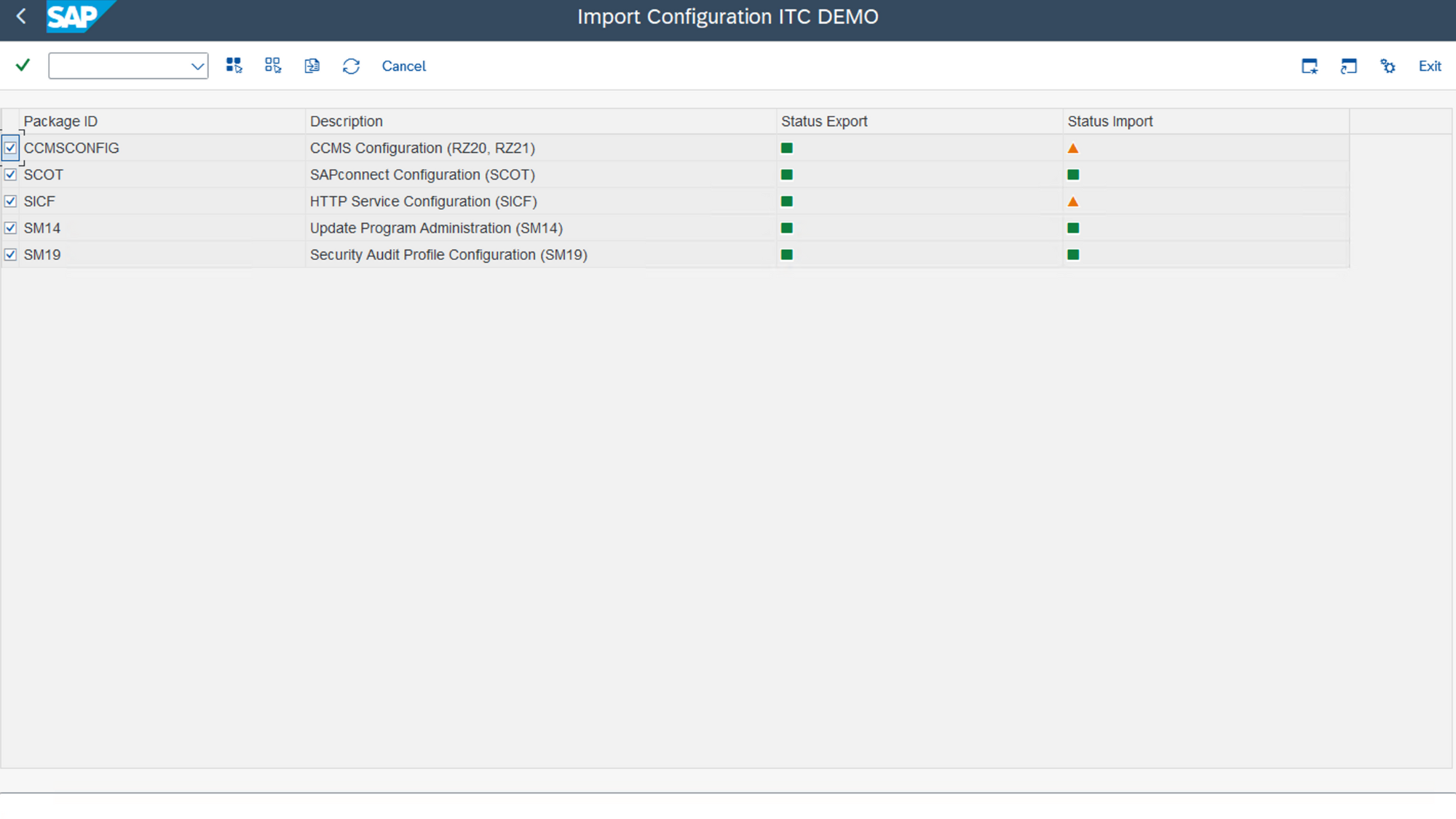
Automate post-copy tasks like reconfiguring system aliases, RFC destinations, and background jobs. This feature reduces manual intervention, minimizes errors, and accelerates the system refresh process, enabling your team to focus on higher-value activities.

flux-demo-import-configuration
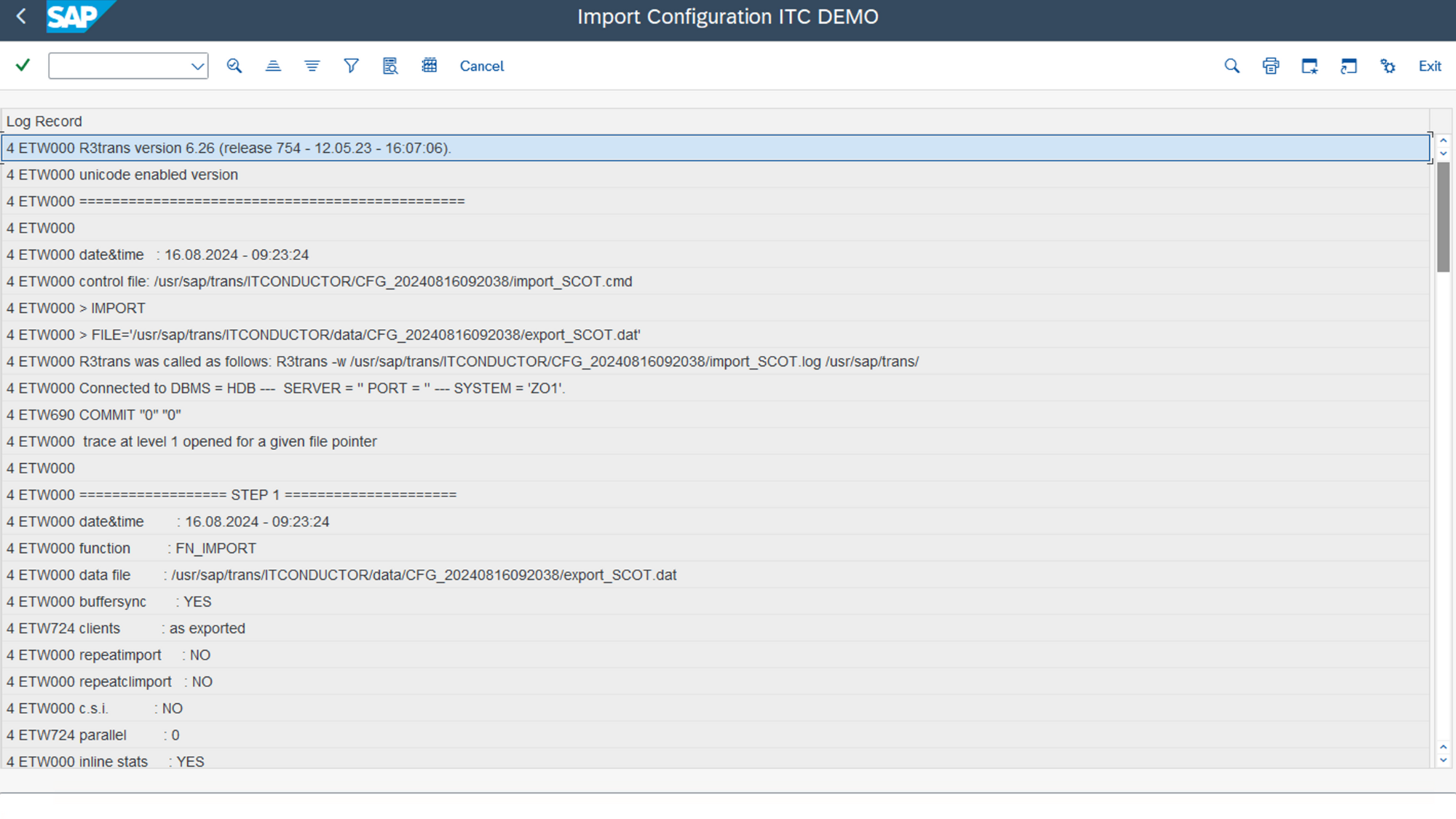
flux-demo-log-records

Monitor and log every step of the refresh process in real-time

Gain full visibility into the SAP system refresh process with comprehensive logging and real-time monitoring. This feature ensures that every step is trackable and auditable, enhancing accountability and reducing the risk of unforeseen issues.

Streamline SAP data exports and imports through SAP GUI integration

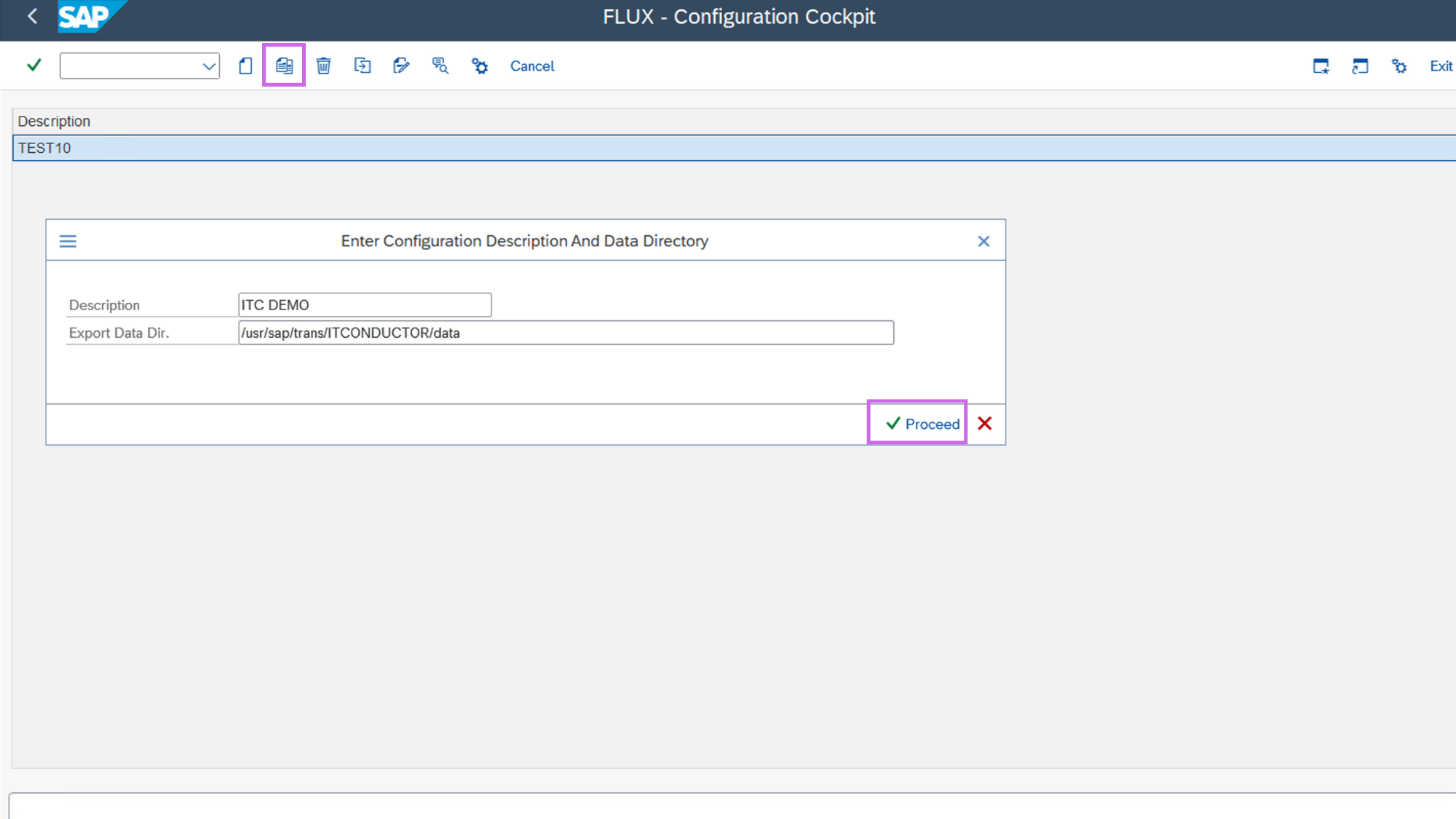
Manage SAP data exports and imports directly within SAP GUI, streamlining your workflow. This feature simplifies complex processes by centralizing them within a familiar interface, ensuring quick and error-free execution.

flux-demo-gui-integration

How does it work?

IT-Conductor FLUX operates through a transport package that needs to be imported into the SAP system. This transport contains all necessary components for the FLUX cockpit, allowing users to manage PCA tasks directly within SAPGUI.

  • IT-Conductor Flux Transport Import
    The transport package containing FLUX needs to be imported into the target and source SAP system. This is done using standard SAP transport management procedures.​
  • IT-Conductor FLUX Cockpit Setup
    Once imported, the FLUX cockpit becomes accessible within SAPGUI. This cockpit is the central interface for managing all PCA tasks.
  • IT-Conductor FLUX Configuration
    Users configure the settings within the FLUX cockpit, such as package file location, BDLS job variants, and export/import settings.
  • IT-Conductor FLUX Export Functionality
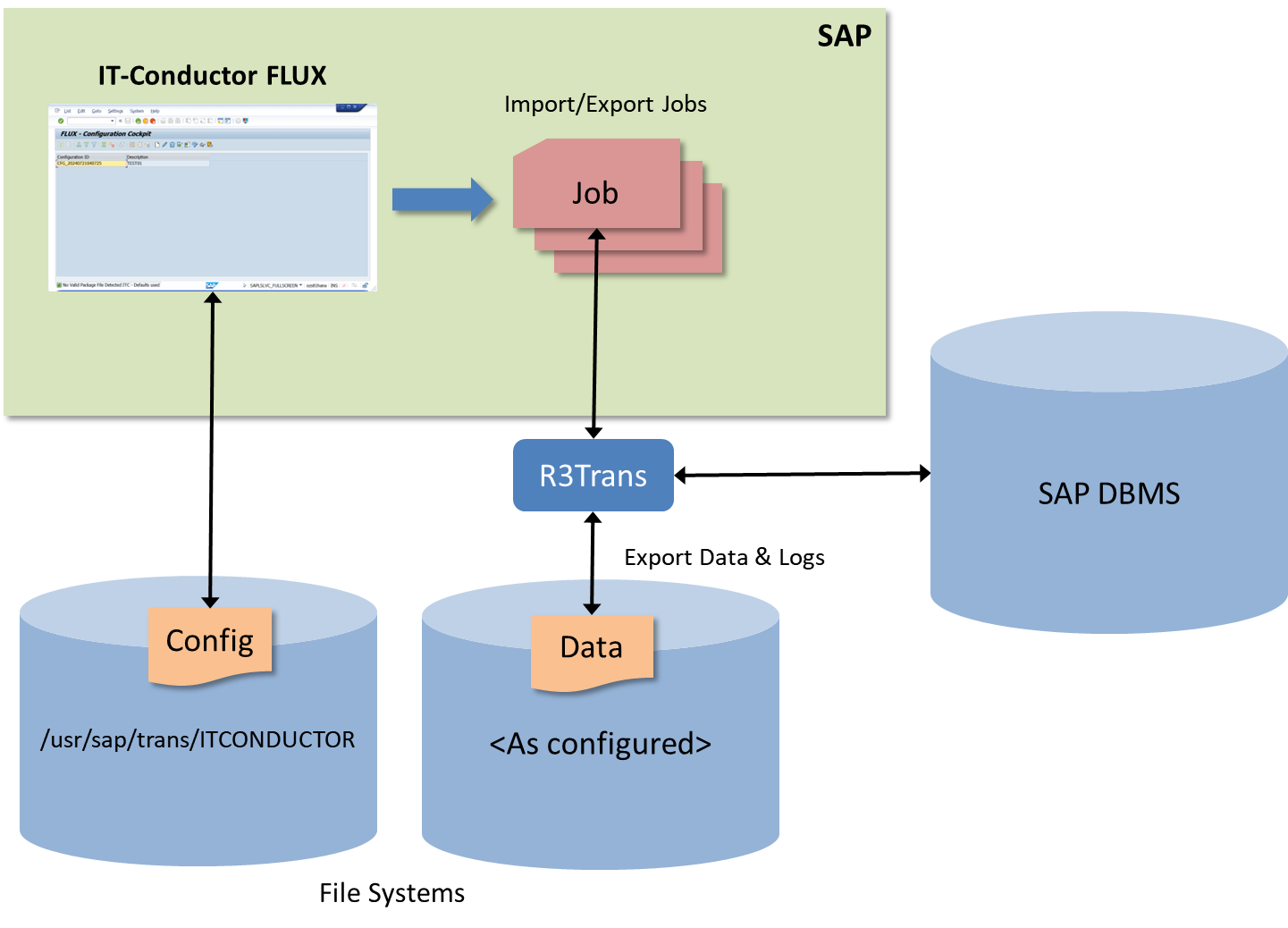
    FLUX uses Function Modules (FMs) to generate R3TRANS exports based on specified criteria. The exported data is stored in a designated directory on the SAP system.
  • IT-Conductor FLUX Import Functionality
    FLUX handles data import using R3TRANS, ensuring smooth and accurate data restoration. The import process includes the ability to execute BDLS jobs post-import for updating logical system names.
  • IT-Conductor FLUX Monitoring & Logging
    FLUX provides comprehensive logging and monitoring of all operations, offering detailed insights into each step of the export/import process. This ensures transparency and ease of troubleshooting.
FLUX Architecture

Watch IT-Conductor FLUX™ in action

Key benefits

  • Efficiency: Automates SAP export/import processes, significantly reducing manual effort and error rates.
  • Transparency: Offers comprehensive logging and monitoring, ensuring clear visibility into all operations.
  • Flexibility: Operates entirely within SAPGUI, eliminating the need for complex OS-level interactions.​
  • Integration: Seamlessly integrates with existing SAP infrastructure and IT-Conductor’s suite of tools.
  • Reliability: Uses SAP’s native R3Trans technology for robust and reliable data handling.

Added value for RISE customers

  • Compliance with RISE Restrictions: Operates without extensive OS-level access
  • Simplified Management: Integrates with SAPGUI, making management within RISE framework easier.​
  • Enhanced Flexibility: Supports Linux & Windows environments, and various RISE customer setups.​
  • Cost-Effective: Alternative to SAP LaMa with minimal dependencies and nearly zero maintenance.​
  • Scalable Solution: Designed to scale with your organization, supporting complex SAP landscapes.
Blog Post

IT-Conductor FLUX™ v1.0.1 is now LIVE

This version brings meaningful enhancements designed to make your export/import workflows more intuitive, more transparent, and more resilient.


Read more

Blog Post

SAP Cloud ERP Post-Copy Automation made easy with FLUX

SAP RISE post-copy automation made easy with FLUX. Speed up system refreshes, reduce errors, and save time. No OS access required.


Read more

Blog Post

IT-Conductor FLUX™ Now Available on AWS Marketplace

This marks another step in making IT-Conductor solutions easier to access and adopt for SAP customers and partners worldwide.


Read more

Blog Post

IT-Conductor FLUX™ now available on SAP Store

We’re excited to announce that IT-Conductor FLUX™ is now available on SAP® Store, delivering automated, efficient system refreshes for SAP NetWeaver and SAP S/4HANA Enterprise Management. 


Read more

Solution Brief

Modernize SAP PCA with automation

Transform system refreshes with the power of automation. Streamline your processes, reduce downtime, and ensure consistent results with our advanced PCA technology.
Plans & Pricing

Get Started Trial

$0

Enjoy unrestricted access to all FLUX features for 1 month

  • crossmark Integration with IT-Conductor's broader suite of APM and DevOps tools

Complete Edition

$5,500/SAP landscape per year

12-month minimum contract duration


  • Checkmark Integration with IT Conductor's broader suite of APM and DevOps tools

Trusted by leading brands worldwide

itconductor-customer-logos

IT-Conductor FLUX is incredibly easy to use! With its seamless integration with SAP, we can now efficiently replace technical data without needing direct OS-level access. Highly recommended!

Frequently Asked Questions

What is SAP post-copy process in a system refresh?

The SAP post-copy process includes the configuration steps performed after a system refresh to make the refreshed system fully functional and aligned with the target environment. These tasks typically involve reconfiguring system aliases, updating RFC destinations, adjusting background jobs, and validating environment settings.

How long does SAP post-copy process normally take?

Post-copy activities generally require 8–10 hours per system, depending on landscape complexity, number of integrations, security requirements, and documentation maturity.

What can go wrong if SAP post-copy steps are skipped or done incorrectly?

Skipping or incorrectly executing SAP post-copy steps can lead to configuration inconsistencies, broken RFC connections, failed background jobs, security and authorization issues, and system instability. These errors may cause integrations to fail, test environments to behave incorrectly, or users to access the wrong data. In some cases, it can delay project timelines and require time-consuming troubleshooting and rework. Proper post-copy execution ensures the refreshed system functions correctly and mirrors the intended target environment.

Can I automate only the SAP post-copy phase of a system refresh?

Yes. You can automate only the SAP post-copy phase without automating the entire refresh. Our customers often start here because post-copy tasks are repetitive, time-consuming, and prone to human error. With IT-Conductor FLUX, you can automate key activities like system configuration, RFC updates, background job adjustments, and cleanup steps, accelerating refresh cycles while maintaining full control.

If you are interested in automating the system refresh process end-to-end, you may explore our system refresh automation solution.