SAP S/4HANA penetration testing helps organizations evaluate how well their security controls withstand real-world attack techniques. However, even when a system successfully blocks exploitation attempts, underlying SAP security vulnerabilities, configuration weaknesses, and gaps in security monitoring may still expose the environment to risk.
To put these controls to the test, we used SAPMAP, a publicly available SAP attack framework, to assess one of our own production-grade SAP S/4HANA lab systems. The exercise involved unauthenticated vulnerability checks, authenticated testing, and a follow-up assessment to examine how changes in user authorizations affected the results.
The findings revealed which security controls successfully prevented the tested attacks, where configuration and access-related risks remained, and what the SAP Security Audit Log captured or failed to capture during the exercise.
In this article, we share the results of our SAP penetration testing exercise and examine why continuous SAP security assessment, vulnerability management, and security monitoring are essential for maintaining cyber resilience beyond a one-time penetration test.
Why a one-time SAP attack test isn't enough
We pointed SAPMAP, a publicly available SAP attack framework, at one of our own production-grade S/4HANA lab systems. The first assessment showed that our patched and hardened environment resisted the unauthenticated exploit checks we ran. It also exposed a message-server information disclosure and raised questions about the visibility provided by native SAP security auditing.
We then took the assessment further.
After updating SAPMAP to a newer version, we repeated the relevant checks and deliberately changed the authorizations of our test account. We wanted to understand not only whether the system could resist an attack, but also how much the outcome depended on the permissions assigned to a valid account.
That distinction matters. A system's security posture can change without a kernel patch or a newly disclosed vulnerability. A role change, an additional RFC authorization, or access to sensitive tables can turn an account that was previously constrained into a much greater risk.
The exercise highlighted three priorities for SAP security teams:
- Validate prevention: Confirm that patches, communication controls, and configuration hardening resist the attacks actually tested.
- Continuously review access: Test how authorization changes affect what a compromised account can do.
- Verify detection: Confirm that relevant activity is recorded and can be investigated, rather than assuming that blocked actions always leave an audit trail.
A penetration test gives you evidence about a system at a particular point in time. Keeping that system secure requires continued assessment as software, threat intelligence, configurations, and authorizations change.
What we tested, and how we kept it safe
The target was one of our own demo systems: an S/4HANA
ABAP stack running on Linux, with kernel release 916 and patch level 100, alongside a co-hosted SAP
HANA database. It is the same environment we use to demonstrate IT-Conductor SecureOps.
SAPMAP operates in several stages. We allowed it to perform discovery, unauthenticated vulnerability checks, authenticated testing using a dedicated test account, and its automated AutoPwn chain, which attempts to compromise systems and pivot across the landscape.
Because SAPMAP is a genuine offensive security tool, we approached the exercise with the same discipline we would apply to an authorized customer assessment.
- Authorization: The assessment was approved internally and restricted to infrastructure we own.
- A dedicated test account: We used a purpose-built account for authenticated testing rather than a production service or monitoring account. The initial run used a restricted authorization profile.
- Controlled comparison: We repeated the authenticated assessment after deliberately granting the test account additional authorizations. This allowed us to compare outcomes while keeping the target environment and general test approach consistent.
- Cleanup: Temporary access and any test artifacts should be reviewed and removed after testing.
These safeguards matter. Even an authorized test can cause an incident if its scope, accounts, potential side effects, and rollback procedures are not defined in advance.
The objective was not simply to demonstrate that our system could resist an attack. It was to understand how its security controls behaved under realistic testing conditions and identify any gaps that needed attention.
In the second run, we granted the dedicated test account an RFC authorization that had been missing during the initial assessment. This allowed us to investigate how the additional permission affected the account's tested capabilities. The results must be interpreted against the scan evidence, distinguishing between attempted, blocked, and successful operations.
Step 1: What an unauthenticated attacker sees
Before attempting to log in,
SAPMAP mapped the landscape in approximately twenty seconds. It identified two systems—the
ABAP stack and the co-hosted
HANA database—and discovered exposed SAP services, including the dispatcher, gateway, message server, SAP Host Agent, and
HANA SQL ports.
One pre-authentication finding emerged from this phase: the gateway responded to an unauthenticated system-information probe with the kernel release and hostname.
This disclosure was low severity on its own, but it still provides useful reconnaissance. An attacker who can identify the exact kernel build and hostname has more information to work with when researching known vulnerabilities and selecting potential attack paths.
The scan also demonstrated the value of the controls already in place. Client enumeration was blocked. The hardened DIAG layer did not confirm which SAP clients existed, meaning SAPMAP could only identify the default client presented by the logon screen.
That distinction is important. A system does not need to be compromised for information exposure to create risk. Small pieces of technical information can help an attacker narrow down targets, understand the environment, and plan subsequent attempts.
Minimize what an unauthenticated party can discover. Segment SAP services from general network access, restrict the gateway and Host Agent to trusted sources, and treat kernel and hostname disclosure as part of the attack surface rather than harmless technical detail.
Step 2: The exploits that bounced off
Once discovery was complete, SAPMAP moved on to unauthenticated exploitation checks—the techniques intended to compromise SAP systems with exploitable vulnerabilities or insufficiently protected services.
In the initial assessment, the attempted exploits did not succeed.
| Attack attempted |
Result in the initial assessment |
Why the control held |
Gateway remote code execution through sapxpg, including CVE-2026-58240 |
No successful exploit observed in the tested configuration |
The patched kernel and gateway protections prevented the tested registration chain. |
| Message-server rogue registration, associated with the “betrusted” attack (CVE-2020-6207) |
Blocked |
system/secure_communication = ON; the message-server connection required TLS/SystemPKI, and the tool could not complete the handshake |
| ICMAD HTTP request smuggling (CVE-2022-22536) |
No successful exploit observed |
The Host Agent returned a clean response without the expected smuggling signature. |
| Connection to the SNC-protected gateway port |
Rejected |
The plain-TCP attempt was refused because SNC was required |
| Default-credential sweep covering SAP*, DDIC, TMSADM, SOLMAN_* and other common accounts |
No successful default-credential logon observed |
The default passwords had been changed. |
These results apply to the checks and configuration tested; they should not be interpreted as proof that the system is immune to every vulnerability or attack technique.
The most important lesson is to patch to the required patch level, not just the kernel release. Two SAP systems can report the same kernel release and still have different vulnerability exposure because fixes are delivered at specific patch levels. Knowing the release alone is not enough to establish whether a system is protected.
In the initial environment, the kernel was running release 916 at patch level 100. The tested gateway and ICMAD checks did not identify a successful exploit under that configuration.
The second lesson is the importance of defense in depth. The system/secure_communication setting and SNC protection helped block the tested message-server and gateway attack paths at the communication layer, before exploitation could proceed.
Transport security does not replace patching. Equally, patching does not eliminate the need for authentication, access restrictions, and network segmentation. Each control addresses a different part of the attack surface.
A system is more resilient when these controls work together rather than relying on a single mechanism to prevent every possible attack.
The one significant finding: A pre-authentication message-server leak
Despite the successful prevention of the tested exploits,
SAPMAP identified a configuration weakness in the initial assessment. The message server's HTTP endpoint on port 8101 returned internal system information to unauthenticated clients.
The disclosed information included:
- Message-server profile parameters: Internal configuration details, including 33 parameters reported by the scan.
- Kernel build information: The system ID (SID), instance name, kernel release and patch level, and build hash.
The finding was rated HIGH in the assessment because it provided detailed reconnaissance without requiring authentication. Combined with the kernel and hostname information discovered earlier, the endpoint gave an unauthenticated party a clearer picture of the target environment.
This was not evidence that the attacker had compromised the system. It was evidence that an exposed interface was revealing information that should have been appropriately restricted.
Root cause and remediation
The root cause was the absence of an appropriate access-control list for the message server's HTTP channel.
The remediation was to configure the message-server ACL parameters:
ms/acl_infoms/HTTP/acl_info
The relevant SAP Notes identified during the assessment were 1421005 and 2696233. After applying the configuration changes, the ASCS instance needed to be restarted, followed by another scan to validate the result.
The original retest was reported to show that the endpoint no longer responded as it had before.
The broader lesson is easy to overlook: securing one communication channel does not automatically secure every channel exposed by the same component.
We had protected the binary message-server channel through TLS/SystemPKI controls, helping block the rogue-registration attack. However, the separate HTTP monitoring channel had remained accessible.
This is why SAP security assessments need to examine individual interfaces and configuration settings rather than treating a component as secure simply because one of its communication paths is protected.
The takeaway
Review all exposed SAP services and their access-control settings. Validate both the binary and HTTP interfaces, apply the appropriate ACLs, and retest after remediation. A configuration gap that does not immediately enable exploitation can still provide an attacker with valuable information.
Step 3: We gave SAPMAP a valid account and it still got nowhere
Unauthenticated testing only tells part of the story. Real attackers may obtain credentials through phishing, compromised endpoints, third parties, or legitimate access that has been misused.
To examine this scenario, we provided SAPMAP with valid credentials for a dedicated, least-privileged test account. The account was able to log in, allowing the assessment to test what could be done after authentication.
In the initial restricted-authorization run, the subsequent attack attempts were unsuccessful.
- Privilege escalation: Attempts involving direct SAP_ALL assignment, the dpmon virtual-SAP* technique, and operating-system command execution through the Web GUI were blocked.
- Password-hash extraction: The account could not read the user table, USR02.
- Secure-store extraction: Attempts to access SSFS and RSECTAB secure storage were unsuccessful.
- Business-data access: The tested scenarios did not provide access to salary information, vendor bank details, purchase orders, or customer records.
- Automated compromise: SAPMAP's AutoPwn chain reported zero compromised systems out of two and zero critical findings.
The common factor was authorization. The test account lacked the permissions required to carry out the attempted operations, including broad RFC permissions for sensitive function modules.
Possessing valid credentials was not enough to obtain elevated privileges or access protected data.
This is precisely why least privilege matters. If an account is compromised, its permissions determine how much damage an attacker can potentially cause. An account with narrowly defined responsibilities creates fewer opportunities for privilege escalation, unauthorized data access, and lateral movement.
For SAP teams, this means resisting the temptation to assign broad permissions simply because they make onboarding, troubleshooting, or integrations easier.
Service accounts and customer onboarding accounts should have only the permissions they need. Broad SAP_ALL assignments and unnecessarily extensive S_RFC and S_TABU permissions can turn a limited compromise into a much more serious incident.
The takeaway
A valid account should not automatically become a privileged account. Carefully designed roles, restricted
RFC access, and regular authorization reviews can prevent compromised credentials from becoming a pathway to wider system access.
After: What changed when we granted the missing RFC authorization?
We reran
SAPMAP after granting the dedicated penetration-test account, the missing
RFC authorization. The objective was to understand whether the additional permission changed what the tool could discover or do through the authenticated connection.
The connection test succeeded, and SAPMAP verified the credentials for the account in client 100. However, successful authentication did not mean the tool could read all the authorization and user-assignment information it requested.
During its capability analysis, SAPMAP attempted to read two tables, AGR_USERS and UST04, but both requests failed with NOT_AUTHORIZED errors. The account could connect to the system, yet these authorization-related inventory reads remained restricted.
 Figure 1: ABAP Application Error
The subsequent vulnerability checks also showed that several technical controls continued to hold:
- Message-server protection: Port 3901 required TLS/SystemPKI. SAPMAP could not complete the required handshake because it did not have a SystemPKI client certificate signed by the target landscape's CA. The tool therefore could not reach the relevant attack path through plaintext. This is a meaningful compensating control, although it does not prove that the underlying kernel vulnerability is absent; patch status must be verified separately.
- Gateway remote-code-execution checks: The initial registration and
sapxpg conversation steps received responses, but the chain failed at the subsequent stage with a stale or unrecognized conversation ID. SAPMAP classified the gateway as not vulnerable to the tested chain. The log suggests that gateway hardening or source-host restrictions may explain the result, but the precise cause was not conclusively established by this output.
- SNC-protected gateway: The exploit attempt against port 4800 was rejected because SNC was required. SAPMAP confirmed that the plaintext attack chain could not proceed through this port.
- ICMAD request smuggling: The probes against ports 1129 and 1128 returned HTTP 404 responses, with no expected smuggling signature. SAPMAP classified the tested ICMAD path as patched or blocked.
The results illustrate an important distinction: granting an additional RFC authorization does not automatically remove every restriction on the account or weaken unrelated network and protocol controls. Authentication succeeded, but the capability analyser still lacked authorization to read the two tables, while the tested gateway and message-server attack paths remained blocked by the controls described above.
The evidence also has limits. These log entries do not establish that the account accessed sensitive business data, extracted password hashes, or compromised the system. Nor do they establish that every possible privilege-escalation or RFC attack path was tested successfully. The conclusions should remain limited to the operations and checks recorded in this run.
For SAP teams, the lesson is to assess authorization changes in context. A permission may enable a specific RFC operation while other access restrictions remain effective. After changing a role or authorization, teams should verify which capabilities have actually changed, confirm that sensitive access remains appropriately restricted, and correlate the results with the available security-audit evidence.
The real lesson: What our monitoring saw and what it missed
The exercise also highlighted the need to distinguish between what preventive controls blocked and what security monitoring actually recorded.
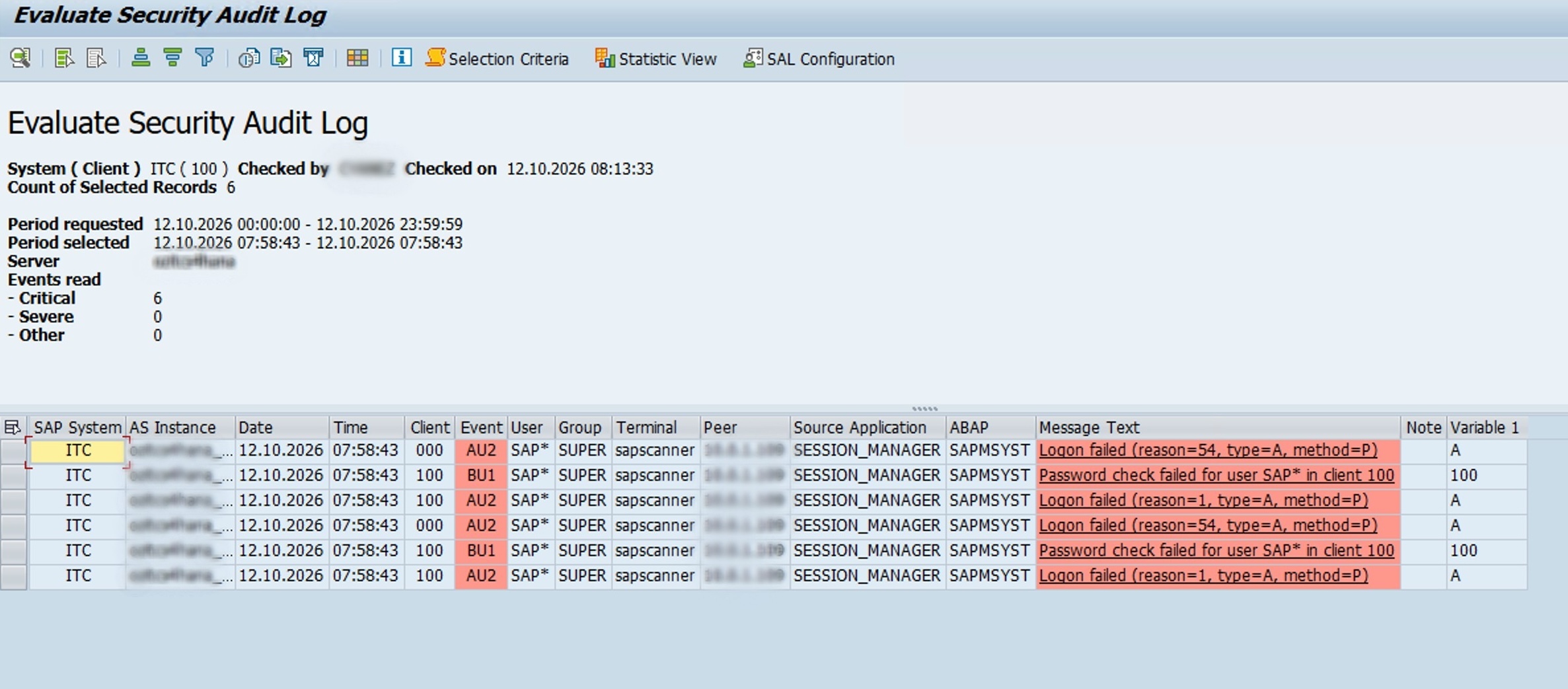
We reviewed the SAP Security Audit Log through transaction SM20 after the initial assessment. The results showed six critical audit records, all timestamped at 07:58:43 on October 12, 2026, associated with the scanner host and terminal sapscanner.
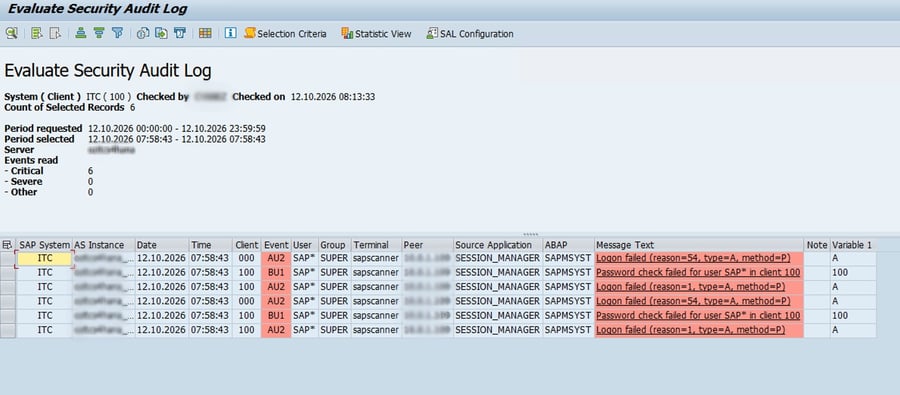
Figure 2: Evaluate Security Audit Log
The records included failed logon attempts for SAP* in client 000 and password-check failures and failed logons involving SAP* in client 100. The source application was SESSION_MANAGER, and the ABAP program shown was SAPMSYST.
This provides concrete evidence that authentication-related activity from the test was recorded by the system.
However, the screenshot represents a specific set of events at a single timestamp. It does not, by itself, demonstrate that every attack attempt was logged or that the system has complete security-audit coverage.
The activity that was visible
The authentication-related events appeared in the SAP Security Audit Log, giving the team a starting point for investigating the scanner's activity.
This is the kind of visibility security teams need when identifying repeated failed logons, unexpected source hosts, and attempts to use default or sensitive accounts.
But recording an event is only the first step. The operational value depends on whether someone can identify its significance, correlate it with other activity, and take the appropriate action.
The activity that required further investigation
The authenticated phase raised a different question: were the attempted privilege-escalation operations, password-table access, and secure-store extraction attempts visible in SM20?
The original test observations indicated that these authenticated actions did not appear in SM20 by default. The screenshot of the six authentication-related events does not independently establish that absence, so the authenticated phase must be evaluated against the relevant audit configuration and the evidence from each test run.
This distinction matters because a blocked action and a logged action are not the same thing. An authorization control may prevent an operation without automatically generating the audit record a security team expects to see.
RFC activity deserves particular attention for two reasons:
- RFC logon and RFC function-call auditing are separate audit categories. Their configuration and coverage need to be reviewed independently. Function-call auditing can generate substantial volumes of events, which is one reason organizations may leave it disabled or insufficiently tuned.
- An authorization failure does not necessarily produce a Security Audit Log entry. Depending on the operation and logging configuration, an RFC call rejected for insufficient authorization may return an error to the calling application without creating the corresponding SM20 record.
Consequently, a security team should not assume that an unsuccessful RFC operation will always be visible in the native audit log.
An attacker using legitimate credentials may attempt operations that the account is not authorized to perform. If those attempts are not captured by the available monitoring mechanisms, the security team may lack the evidence needed to reconstruct the activity.
Closing the visibility gap
SM20 remains an important source of security evidence, but it should not be treated as the only source.
A more comprehensive monitoring strategy should include:
- Reviewing RFC audit configuration: Verify which RFC logon and function-call events are captured, and tune the configuration according to security and operational requirements.
- Monitoring unexpected logon sources: Investigate logons from unusual hosts, particularly when they involve sensitive or privileged accounts.
- Correlating authorization failures: Where the relevant logs and telemetry support it, monitor denied access to sensitive function modules and investigate repeated or unusual patterns.
- Expanding beyond the security audit log: Correlate available gateway logs, read-access logging, and database-layer events to improve visibility into activity that may not appear in SM20.
- Validating detection through testing: Repeat controlled security tests after configuration changes to verify which events are generated, where they appear, and whether alerts reach the appropriate team.
The objective is not to enable every possible log indiscriminately. Excessive logging can create noise, storage costs, and operational overhead. Instead, organizations should identify the events most relevant to their threat model, configure appropriate coverage, and test that the resulting evidence is usable.
The takeaway
Preventive controls can stop an attack, but they do not automatically guarantee that the attempt will be visible. SAP teams need to validate both protection and detection, particularly around RFC activity, authorization failures, and sensitive data access.
What the second run tells us about detection
The second
SAPMAP run raised an important question beyond whether the system's preventive controls held: could we see the activity in the SAP Security Audit Log?
SAPMAP successfully authenticated using the created account after we granted the additional RFC authorization. However, when we reviewed transaction SM20, we found no corresponding audit records for the activity we were investigating.
This is an important distinction. Successful authentication confirms that the account could establish a session, but it does not tell us whether subsequent RFC calls, authorization failures, or data-access attempts were recorded. In this case, the absence of corresponding SM20 entries meant that we could not use the Security Audit Log alone to reconstruct the activity observed during the test.
The finding does not automatically mean that SAP logging was completely disabled or that every operation should have generated an SM20 record. The Security Audit Log captures selected events according to its configuration, and not every RFC call or failed authorization check necessarily produces a corresponding entry. Nevertheless, the absence of expected evidence highlights the need to validate audit coverage against the activities that matter to the organization.
Key Takeaways: From successful prevention to continuous resilience
The initial
SAPMAP assessment demonstrated that a patched, hardened S/4HANA system with appropriate communication controls and least-privileged access can resist a range of tested attack techniques.
It also revealed a message-server HTTP configuration gap and highlighted the importance of validating audit coverage instead of assuming that native logging captures every relevant event. The expanded-authorization retest is intended to show how the risk changes when the same account receives additional permissions; its conclusions must be based on the verified second-run output.
For SAP teams, the practical recommendations fall into two areas.
- Patch management: Maintain the required kernel patch level rather than relying on the release number alone.
- Secure communications: Enforce SNC and configure
system/secure_communication = ON where applicable.
- Message-server protection: Configure
ms/acl_info and ms/HTTP/acl_info to restrict the binary and HTTP channels appropriately.
- Default credentials: Change default passwords for SAP*, DDIC, TMSADM, SOLMAN_* and other relevant accounts.
- Least privilege: Keep service and onboarding accounts narrowly scoped. Avoid unnecessary SAP_ALL access and excessive S_RFC and S_TABU permissions.
- Network exposure: Minimize and segment access to the gateway, SAP Host Agent, message server, and other pre-authentication interfaces.
- Validation: Retest exposed services after remediation to confirm that the intended restrictions are effective.
- Review and tune the RFC logon and RFC function-call audit categories.
- Monitor logons from unexpected hosts and investigate suspicious activity involving sensitive accounts.
- Assess how authorization failures against sensitive functions are recorded and whether additional monitoring is required.
- Correlate SM20 with gateway logs, read-access logging, database-layer events, and other relevant telemetry.
- Validate the monitoring configuration using controlled tests and confirm that meaningful findings can be investigated and acted upon.
These measures help move SAP security from a point-in-time configuration check toward a repeatable process of assessment, remediation, and verification.
Patch Tuesday follow-up: Why continuous assessment matters
A penetration test is a snapshot of the environment and attack techniques evaluated at a particular time. SAP's security advisories continue to evolve, and new vulnerabilities may require action even when an earlier assessment produced reassuring results.
SAP published its October 2026 Security Patch Day updates on October 13, 2026. We subsequently reran SAPMAP using an updated version and assessed the landscape against the latest security information available to our team.
These are two complementary activities. SAPMAP tests the attack paths and checks implemented in the tool. Security Note and compliance assessments evaluate whether the system's components, patch levels, and configuration meet the relevant security requirements.
A successful SAPMAP run does not prove that a system is unaffected by every newly disclosed vulnerability. Equally, a Security Note finding does not by itself prove that a specific exploit succeeds against the system. The two forms of assessment answer different questions and should be used together.
What the SRI assessment revealed: Identity, access, and audit risk
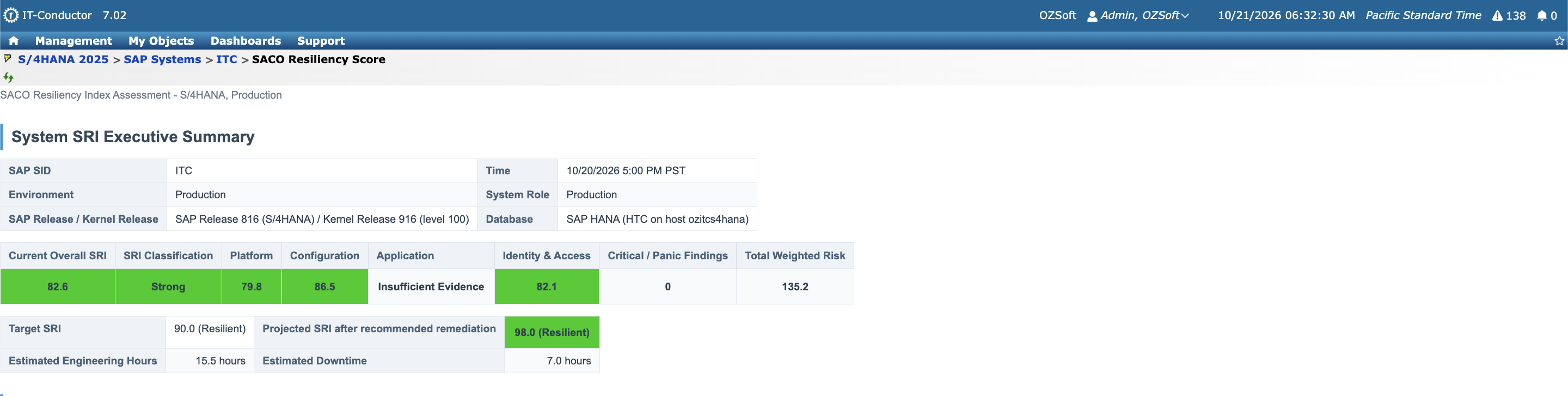
The penetration test was not the only source of security evidence available for our S/4HANA environment. We also reviewed the IT-Conductor SACO Resiliency Index (SRI) assessment to understand how the system's broader security posture was reflected across platform, configuration, and identity-and-access controls.
The assessment returned an overall SRI score of 82.6, classified as Strong, against a target score of 90.0. The individual pillar scores were 79.8 for Platform, 86.5 for Configuration, and 82.1 for Identity & Access. The report projected an overall score of 98.0, classified as Resilient, after the recommended remediation actions.
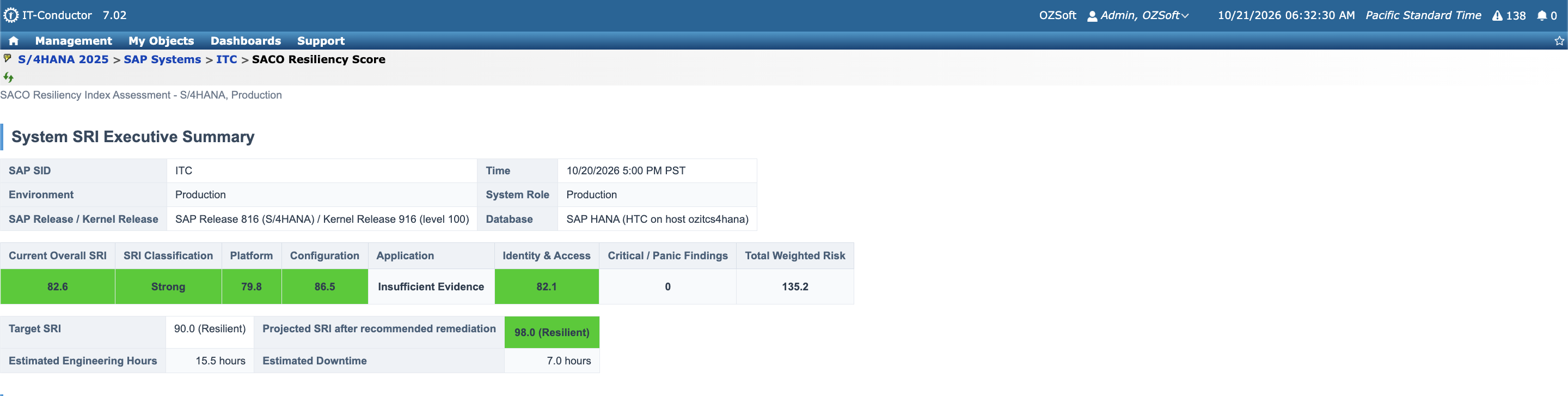
Figure 3: SACO Resiliency Score (System SRI Executive Summary)
The findings are particularly relevant when considered alongside the penetration test. The SRI assessment identified security risks that extended beyond whether a particular exploit succeeded.
Identity and access: What the assessment found
The Identity & Access pillar had a score of 82.1 and included two findings directly related to privileged-account activity:
- RFC-based access to USR02: Finding F5 identified a generic table read of USR02, the SAP user master and password-hash table, through RFC by user SAP*. The assessment associated this event with September 2, 2026, and classified it as a high-severity privileged-access finding. The recommended action was to investigate the SAP* RFC session, review and revoke unnecessarily broad S_TABU_DIS/S_RFC authorizations for USR02, and enforce password-hash rotation if exposure is confirmed.

Figure 4: RFC-based Access to USR02
- Failed SAP logons: Finding F6 identified failed logon attempts involving the privileged SAP* user from the terminal
sapscanner on October 12, 2026—the date of the penetration test. The assessment recommended investigating the scanner source, restricting default-user logon clients, and reviewing whether SAP* dialog logon should be locked down.

Figure 5: Failed SAP Logons
The second finding provides a direct connection between the penetration-test activity and the evidence collected by the SRI assessment. It demonstrates that the scanner's failed authentication attempts were represented in the security findings.
The first finding requires a different interpretation. Its recorded date predates the October penetration test, so it should not automatically be attributed to the authorization change made for the test account. The RFC authorization that was subsequently granted may have enabled additional test operations, but confirming that relationship requires correlating the relevant user, RFC activity, authorization changes, and timestamps.
This distinction is important: an authorization change can alter what a valid account is capable of doing, while audit evidence can reveal activity that occurred before, during, or after a controlled test. Those are related aspects of security, but they are not interchangeable conclusions.
Audit configuration is part of the security posture
The SRI report also raised a monitoring concern. Finding F7 recorded a security-audit configuration and log-medium change on October 16, 2026, classified as a high-severity finding. The assessment noted that the audit-trail modification had not been accompanied by evidence of a corresponding
SIEM alert or ticket.
Figure 6: Security Audit Configuration
This finding reinforces the lesson from the SM20 review: collecting audit records is not enough by itself. Security teams also need to protect audit configuration, detect meaningful changes, and ensure that relevant events reach the monitoring and incident-response process.
Turning the findings into action
The SRI assessment's recommended remediation sequence prioritized eight findings, including a pending
SAPUI5 XSS security note,
SAPGUI scripting controls, insecure
SNC-related GUI and
RFC logons, a missing gateway
ACL file, privileged
RFC table access, failed SAP* logons, and audit-configuration monitoring.
The report estimated 15.5 engineering hours and 7 hours of downtime for the full recommended remediation sequence. Completing those actions was projected to increase the overall SRI score from 82.6 to 98.0.
These figures describe the report's remediation scenario, not a completed improvement. The projected score should therefore be treated as a planning estimate until the fixes are implemented and the assessment is rerun.
Taken together, the SRI and penetration-test results demonstrate why SAP security should be evaluated from multiple angles. A penetration test helps establish which attack paths succeed under specific conditions. The SRI assessment adds a broader view of configuration weaknesses, privileged access, patch status, and monitoring controls.
The objective is to connect the evidence: determine which findings are related, validate the underlying activity, remediate the confirmed weaknesses, and reassess the system to verify that its security posture has improved.
How IT-Conductor SecureOps helps close the gap
This is where IT-Conductor SecureOps becomes relevant.
The SAPMAP exercise demonstrated two complementary requirements: identifying security weaknesses before attackers exploit them and ensuring that suspicious activity does not disappear into gaps between preventive controls and monitoring systems.
SecureOps is designed to help SAP teams continuously assess security configurations against applicable SAP recommendations, identify vulnerabilities and hardening gaps, analyze Security Audit Log findings, and prioritize remediation according to risk.
For example, a missing message-server ACL is not simply another configuration item to add to a report. It is a finding that needs to be identified, assessed for its potential impact, assigned an appropriate priority, and remediated. The resulting configuration should then be validated to confirm that the exposure has been addressed.
The same principle applies to monitoring. Audit-related findings need operational context so teams can understand which events are being captured, which controls require attention, and where further investigation is necessary.
SecureOps supports this process by bringing security assessment and remediation into a more structured operational workflow. Combined with appropriate SAP-native logging and monitoring, it can help teams reduce blind spots, address configuration weaknesses, and maintain a clearer view of their security posture.
The key is to avoid treating a successful scan or a clean patch report as proof of complete security. Security assessments should lead to action, and remediation should be followed by validation.
The bottom line
The initial assessment showed that the tested unauthenticated exploits failed and that the restricted test account could not perform the privileged operations or access the protected data covered by the initial test. It also exposed a message-server HTTP information disclosure and highlighted the importance of validating security-audit coverage.
The broader SRI assessment added evidence of risks involving privileged RFC access, failed SAP* logons, and audit-configuration monitoring. These findings reinforce the need to evaluate preventive controls, identity and access, and monitoring together—while keeping each conclusion tied to its own evidence.
The expanded-authorization retest provides an opportunity to determine how granting the missing RFC authorization changed the account's tested capabilities. The results should establish which additional operations, if any, became possible and whether the associated activity was recorded. These conclusions must be based on the verified scan output and correlated audit records, rather than inferred from the authorization change alone.
A resilient SAP environment needs both prevention and detection. Patching, secure communications, restrictive authorizations, and carefully configured access controls reduce the likelihood and impact of compromise. Audit configuration, log correlation, and continuous validation help teams understand what happens when someone tests those controls.
IT-Conductor SecureOps helps SAP teams turn security findings into prioritized, actionable remediation and ongoing validation —so security is not limited to the moment a report is generated, but becomes part of everyday SAP operations.
The goal is not simply to make attacks fail. It is to understand what remains exposed, verify that the right controls are working, and ensure that suspicious activity can be investigated when it matters most.