SAP Migration
How AI Simplify SAP S/4HANA Upgrades
S/4HANA upgrades are complex and time-critical. See how AI reduces guesswork, identifies risks early, and keeps upgrades on track.
SAP S/4HANA upgrade testing guide covering strategy, risk-based planning, automation, performance testing, and tools to ensure a smooth, low-risk migration
SAP S/4HANA upgrades demand a different testing approach than traditional ERP updates. Beyond software patches, they require adapting to simplified data models, Fiori user experiences, embedded analytics, and a reimagined HANA in-memory architecture.
The business risks are significant, and technical upgrades take an average of three to six months when properly prepared, yet many organizations still treat testing as a final checklist item rather than an integral component of upgrade success.
In this blog post, we’ll go through a comprehensive test strategy framework that balances thoroughness with project timelines and budgets.
When you move from SAP ECC to S/4HANA, you're switching to an entirely different way SAP handles data:
The simplified data model removed thousands of duplicate tables. Your custom code that relied on old tables needs updates, and testing must verify that business processes work correctly without data loss. Many old data tables are replaced with CDS (Core Data Services) Views.
The user interface changed with Fiori apps replacing old SAP GUI screens. Testing covers traditional screens and new mobile-friendly Fiori interfaces across devices and browsers.
Real-time analytics built into S/4HANA strain your system more than old overnight reports, creating new testing scenarios.
To move to S/4HANA, we have three upgrade paths:
Greenfield (clean slate): Build a new S/4HANA system from scratch; requires extensive configuration and data migration testing.
Brownfield (re-use): Convert an existing ECC system to S/4HANA while retaining historical data and customizations; requires comprehensive regression testing.
Bluefield or Selective Data Transition (SDT): A hybrid approach that selectively migrates data and redesigns processes while retaining others; requires testing both newly designed and converted business processes working together.
Define measurable objectives: Specific goals like "month-end close within current timeframes" or "99.9% integration reliability."
Form a cross-functional test team:
IT (for technical expertise)
Business owners (for validation)
Power users (to test realistic scenarios)
Executive sponsors (for resources and decisions)
Establish test environments: Sandbox (exploration), Development (code changes), QA (integration/UAT), Pre-production (final validation/cutover)
Mirror production: Match data volume, integrations, and configuration, just as you’d have them right now
Manage test data: Production refreshes with masking or synthetic datasets
Automate reconciliation: Verify nothing is lost in migration
Industry studies show that manual testing accounts for between 25% and 30% of total SAP project costs, and many organizations still rely on it, which is time-consuming and error-prone. For S/4HANA upgrades, a comprehensive testing approach must span multiple layers: unit testing (custom code), integration testing (cross-module processes), regression testing (existing functionality), performance testing (scalability), user acceptance testing (business validation), and security/compliance testing.
As discussed in our post on Understanding the Importance of QA in Automation Projects, well-defined quality assurance ensures automated conversion processes work as expected. Treat these test types as complementary layers building confidence, with clear entry/exit criteria and focused coverage where it reduces go-live risk the most.
Beyond standard ERP testing, S/4HANA upgrades require special attention to areas that are unique to this platform. These critical focus areas represent the biggest sources of risk and complexity in most upgrade projects. Prioritizing testing efforts in these areas helps catch issues early before they impact your go-live:
Custom code: ABAP Test Cockpit identifies incompatible code; testing must verify that the remediated code delivers the same business outcomes.
Fiori UX: Verify apps function correctly and perform well across browsers with proper access controls. Watch for sluggish interfaces.
Data model: Verify reports and custom programs accessing deprecated tables produce accurate results through reconciliation, including new CDS views.
BTP integrations: Validate connections under load, including error handling.
Migration testing: Validate data quality before migration, verify completeness after, and reconcile financials.
Performance testing for critical business processes: S/4HANA's in-memory architecture performs differently than traditional ECC systems, making comprehensive performance testing essential:
Interactive SAP GUI users: Test critical transactions under realistic load conditions with concurrent users executing typical business workflows
Fiori apps: Validate response times with multiple concurrent users across different devices and network conditions to ensure acceptable performance
Batch processing: Execute background jobs, mass data uploads, and scheduled reports to ensure they complete within acceptable timeframes
Integration scenarios: Test RFC (Remote Function Calls), SAP PI/PO (Process Integration/Process Orchestration), SAP Integration Suite, and other middleware connections under load to verify stability and throughput
Peak period simulation: Performance testing should simulate your actual peak business periods to verify that the system can handle real transaction volumes without degradation
For detailed guidance on structuring your performance testing approach, download our SAP Performance Testing Strategy Sample document.
Automation is essential for managing the S/4HANA testing scope. The sheer volume of test cases, combined with the need to execute them repeatedly throughout the upgrade lifecycle, makes manual testing alone impractical and cost-prohibitive. Automation not only accelerates testing cycles but also improves accuracy by eliminating human error in repetitive tasks.
The key is strategic automation: focus your efforts on tests that will be executed repeatedly throughout the project. This includes regression test suites that validate existing functionality after each configuration change or code update, end-to-end business processes spanning multiple modules (which are time-consuming to execute manually), performance and load testing that simulates realistic user volumes, and data validation that compares thousands of records between source and target systems.
Tools include SAP Solution Manager, which offers built-in test management capabilities that integrate directly with your SAP landscape for test case management and execution tracking, and IT-Conductor SUMMon.
IT-Conductor SUMMon is a powerful complement to SAP Solution Manager, providing advanced monitoring and orchestration capabilities specifically designed for SAP upgrades and migrations. SUMMon delivers real-time visibility into your entire upgrade progress, with automated phase tracking that monitors each step of the Software Update Manager (SUM) process. It integrates seamlessly with SUM to provide live status updates across all systems, eliminating the need for teams to manually review thousands of log entries scattered across different servers.
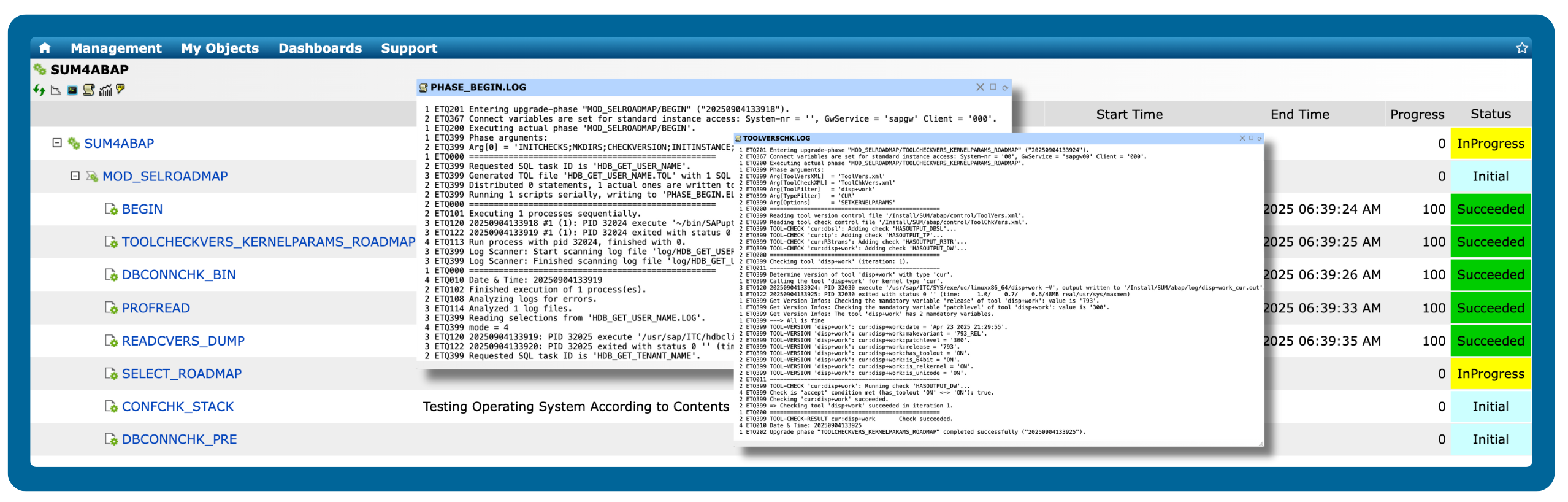
Figure 1: SAP Upgrade Phase Logs
When issues arise during testing or cutover, SUMMon's intelligent alerting system immediately notifies the right team members with full context about what failed and where, enabling faster resolution. The platform's centralized monitoring dashboard gives project managers, Basis teams, and business stakeholders a unified view of upgrade progress, testing status, and potential bottlenecks—all in one place.
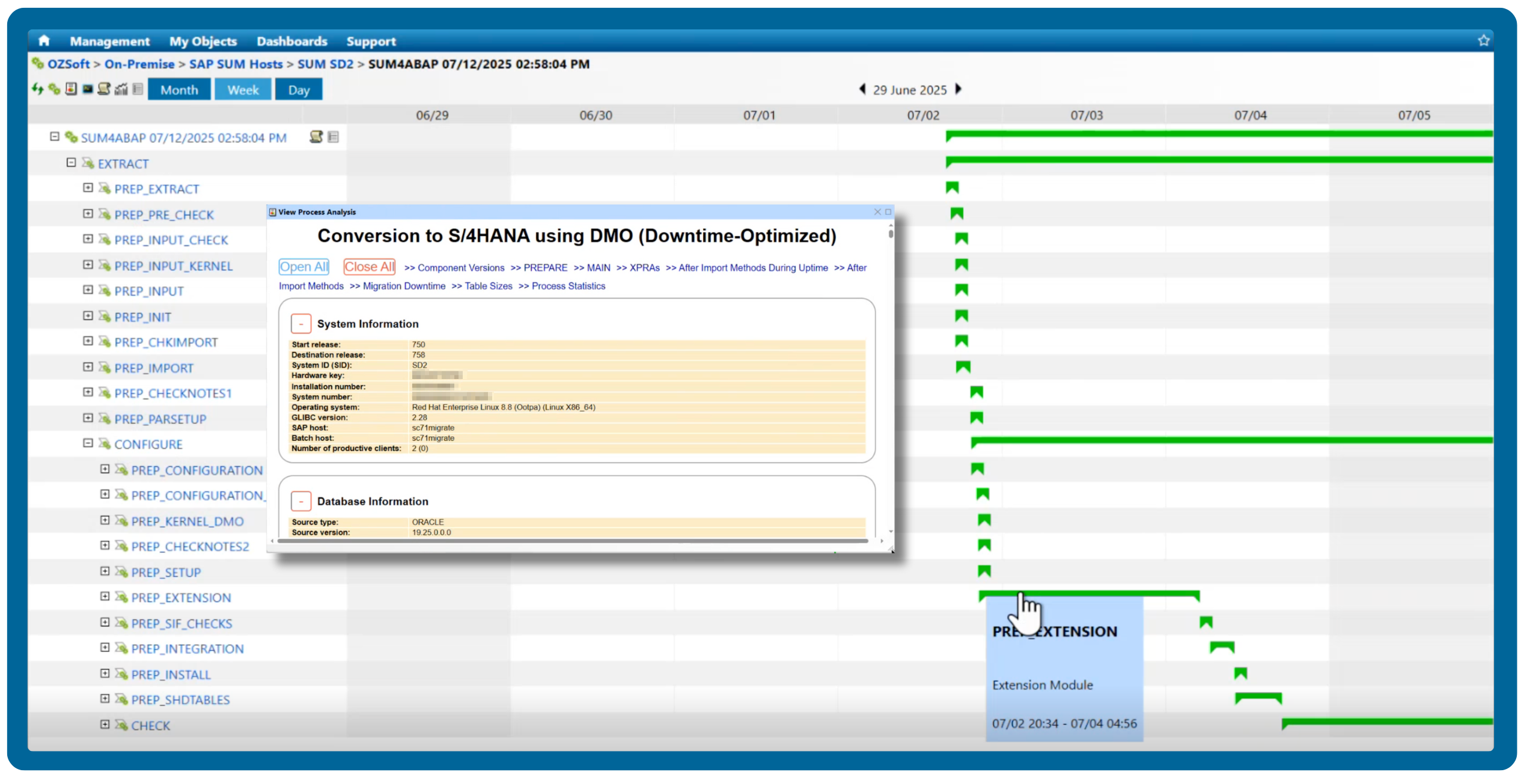 Figure 2: SAP Upgrade Gantt Chart and Reporting
Balance automation with manual testing for exploratory scenarios and edge cases. Build maintainable, well-documented test scripts that become reusable assets for S/4HANA's quarterly release cycle, making future upgrades faster and less risky.
Your test plan serves as the blueprint for all testing activities, translating your strategy into concrete, actionable steps. Start by identifying all business processes that require validation, then work with business process owners to understand which processes are most critical to operations and which carry the highest risk if they fail.
Apply the 80/20 rule: focus on identifying the 20% of business processes that represent 80% of your business value or risk, and ensure these receive the most thorough testing coverage.
Risk-based testing (RBT) provides a systematic approach to prioritization. This methodology prioritizes testing efforts based on the probability and impact of risk.
Test data requirements are critical yet often overlooked. Document what data is needed for each test case: specific customer numbers, material masters, open sales orders, accounting documents, and any other master or transactional data required to execute the test. Identify data dependencies between test cases and ensure all required test data is available before testing begins.
Define clear phase gates between testing stages to maintain quality and prevent issues from cascading. For example, integration testing shouldn't begin until all unit testing is complete and critical defects are resolved.
Even the most comprehensive test strategy fails without disciplined execution and effective management throughout the upgrade project. Success requires careful coordination of resources, clear communication, and proactive monitoring of progress against milestones.
Create detailed test schedules that outline when each testing phase will occur, which resources are allocated to each activity, and which milestones must be met to stay on track. Build in buffer time for issue resolution. Testing rarely goes exactly as planned, and you need flexibility to address unexpected problems without jeopardizing go-live dates. Key milestones should include completion of test case development, successful completion of each testing phase, resolution of all critical defects, and final cutover rehearsal.
Secure resource commitments early from all stakeholder groups. Testing an S/4HANA upgrade is resource-intensive, requiring business users to take time away from daily responsibilities to execute test scenarios and validate results.
Schedule comprehensive training well before user acceptance testing begins. If business users haven't been trained on new Fiori interfaces or S/4HANA functionality, they cannot effectively validate whether the system meets their needs.
Establish regular communication rhythms, including weekly testing status meetings with all stakeholders. Use visual dashboards that provide real-time visibility into testing progress, allowing stakeholders to see at a glance how many test cases have been executed, current pass/fail rates, and defect burn-down trends.
Cutover testing tests the plan before implementation. Cutover simulation validates not just that the system works technically, but that your team knows how to execute the complex sequence of technical and business activities required to transition from the old system to the new.
After the cutover rehearsal, conduct a formal go/no-go assessment with all stakeholders. Review whether all success criteria have been met: Are all critical defects resolved? Is the technical infrastructure ready? Are business users trained and confident? Only proceed to production cutover when you can answer yes to all these questions.
IT-Conductor provides comprehensive monitoring and management extending beyond the upgrade itself, with continuous visibility into upgraded applications' performance to identify and resolve issues before they impact operations.
During migration and upgrade, IT-Conductor SUMMon provides critical support through real-time phase tracking and centralized monitoring. SUMMon integrates with SUM to provide live status updates across all upgrade phases, eliminating manual log reviews. When issues arise during testing or cutover, SUMMon's alerting and collaboration features ensure the right team members are notified immediately with full context.
By combining a robust test strategy with IT-Conductor's monitoring and orchestration capabilities, you position your organization for a smooth S/4HANA upgrade, delivering improved efficiency, real-time insights, and simplified operations. The investment in testing today pays dividends for years to come.
Ready to streamline your SAP S/4HANA upgrade? Discover how IT-Conductor SUMMon can keep your upgrade on track with real-time visibility and centralized monitoring.

S/4HANA upgrades are complex and time-critical. See how AI reduces guesswork, identifies risks early, and keeps upgrades on track.
Prepare for your SAP S/4HANA upgrade before 2027. Explore migration options, deployment models, and download the roadmap guide to start planning...
Install S/4HANA on-premise with a cloud-based S/4HANA monitoring tool. Monitoring S/4HANA like never before!