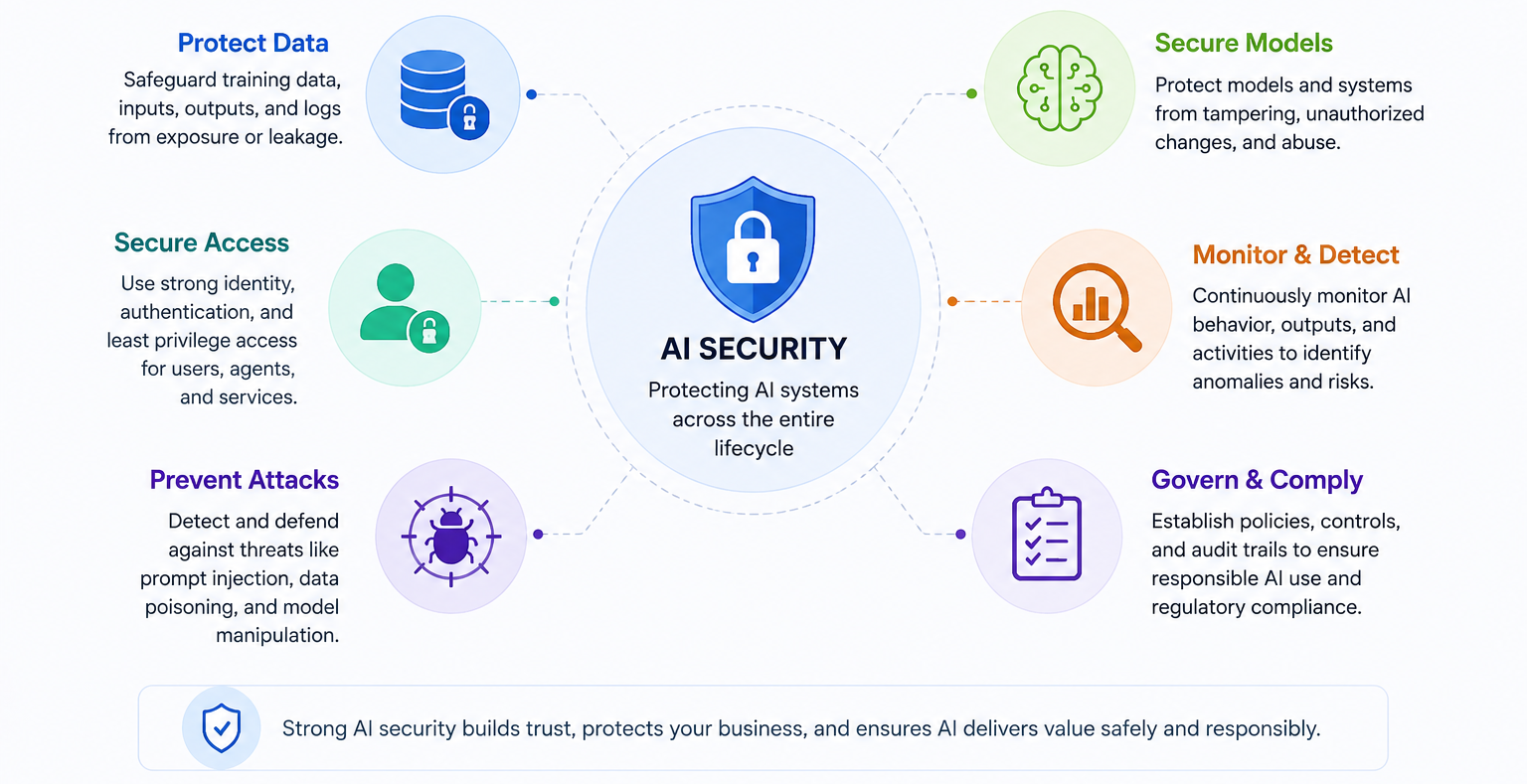
AI applications are becoming part of enterprise operations, but as adoption grows, so does the need for stronger AI security.
Securing AI applications means protecting the models, prompts, data, identities, APIs, endpoints, agents, tools, and connected systems that allow AI to operate. Traditional application security is still important, but AI introduces new risks, including prompt injection, excessive agent permissions, unauthorized actions, public exposure of AI endpoints, sensitive data leakage, and insecure tool access through technologies such as MCP servers.
So, how do you secure AI applications in an enterprise environment? The answer starts with visibility. Organizations need to know where AI is running, what data each AI application can access, which identities and permissions are involved, and how AI agents behave at runtime. From there, security teams can apply least privilege, restrict public exposure, protect sensitive data, monitor suspicious prompts, enforce guardrails, and connect AI security findings to remediation workflows.
In this post, we’ll look at the most common AI application risks in enterprise environments and outline a practical approach to securing AI applications.
What is AI security?
AI security is the practice of protecting AI systems, data, and models from misuse, unauthorized access, manipulation, and unsafe behavior. It covers the full AI application lifecycle, including design, development, deployment, runtime operations, monitoring, and remediation. In enterprise operations, AI security becomes more complex when AI applications are connected to privileged tools, internal data, production systems, and automation workflows.
 Figure 1: AI Security
In an enterprise environment, AI security includes protecting:
- AI applications and AI agents
- Model APIs and AI-powered endpoints
- MCP servers and connected tools
- Prompts, responses, and logs
- Sensitive business data
- Identities, permissions, service accounts, and API keys
- Cloud workloads and infrastructure dependencies
- Automation workflows and downstream business systems
AI security is especially important because many AI applications do more than generate responses. Agentic AI platforms can retrieve data, call tools, trigger workflows, query databases, modify records, open tickets, execute code, or interact with external services. These capabilities can improve productivity, but they also increase risk when access and behavior are not properly controlled.
Common AI security risks in enterprise environments
Before organizations can secure AI applications, they need to understand the most common AI application risks.
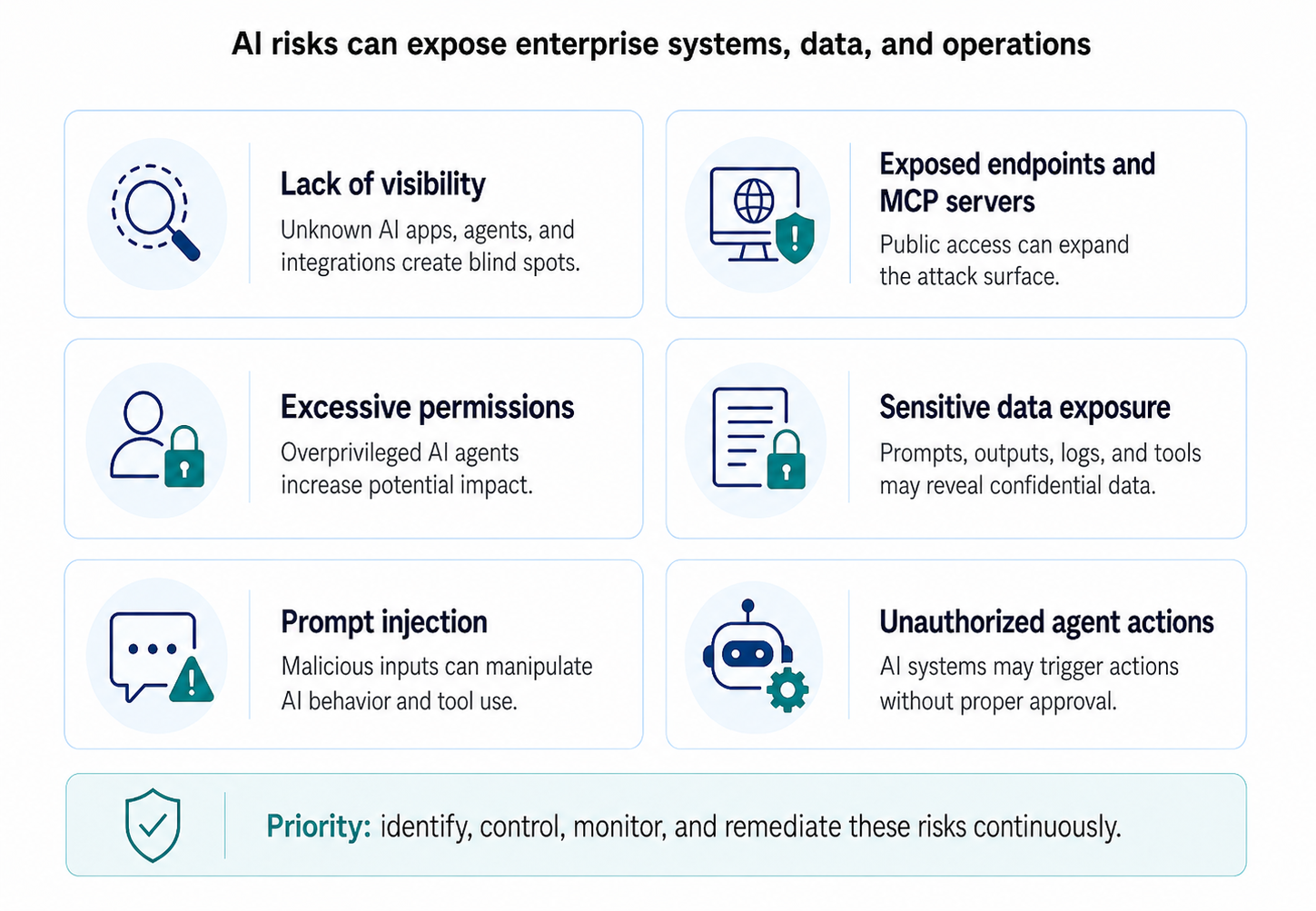
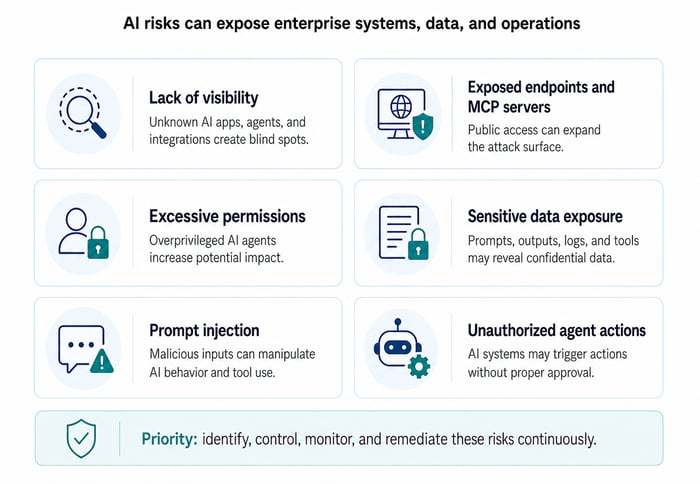 Figure 2: Common AI Security Risks
These risks are directly tied to how AI systems are deployed, integrated, and operated in production. By identifying where AI applications are most likely to expose data, inherit excessive access, or trigger unintended actions, security teams can prioritize the controls that matter most.
1. Lack of visibility into AI applications
One of the biggest AI security risks is not knowing where AI is running. AI may be deployed across cloud workloads, internal applications, SaaS platforms, developer tools, data pipelines, automation scripts, monitoring platforms, and business applications. Some AI applications may be created by developers, business teams, or vendors without being added to a central inventory.
Without visibility, security teams cannot assess exposure, ownership, permissions, data access, or business impact. They may not know which AI applications are connected to sensitive data, which AI agents have tool access, which MCP servers are active, or which AI endpoints are publicly available.
2. Public exposure of AI endpoints and MCP servers
Publicly exposed AI endpoints create a major security concern, especially when they are connected to internal systems or sensitive data. An exposed endpoint may allow unauthorized users to submit prompts, test guardrails, manipulate workflows, or attempt to trigger unintended behavior. If the AI application is connected to an MCP server, the risk becomes more serious because MCP access can extend the AI agent’s capabilities across tools, databases, APIs, monitoring systems, and automation workflows. Security teams should verify whether AI endpoints and MCP servers are internet-facing, exposed through developer tunnels, accessible from unmanaged networks, or protected only by shared keys.
3. Excessive permissions for AI agents
AI agents often need access to tools and data to be useful. However, excessive permissions are one of the most significant AI application risks. An AI agent should not have broad access simply because it is easier to configure during development. Overprivileged AI agents increase the potential impact of prompt injection, compromised credentials, misconfiguration, or unauthorized use.
In SAP environments, if an AI agent can retrieve SAP system status, list unimplemented SAP security notes, analyze CVE-related risks, or create incidents, those capabilities should be governed by the user’s approved permissions and logged for auditability.
4. Sensitive data exposure
Many enterprise AI applications are designed to retrieve, summarize, process, or generate content based on business data. This creates a high risk of sensitive data exposure.
Sensitive data may include customer records, employee information, financial data, intellectual property, source code, credentials, regulated data, SAP system details, vulnerability information, or confidential business documents. AI applications may expose this data through prompts, outputs, logs, third-party API calls, or unauthorized retrieval from internal systems.
5. Prompt injection and suspicious prompts
Prompt injection occurs when a user or attacker creates input designed to manipulate the AI system into ignoring instructions, revealing sensitive information, or performing unauthorized actions. It becomes more dangerous when the AI application has tool access. A malicious prompt may try to force an AI agent to retrieve restricted records, call an unapproved API, bypass guardrails, create unauthorized tickets, trigger automation, or send sensitive information externally.
6. Unauthorized agent actions
An AI agent may open tickets, modify configurations, trigger workflows, execute code, query databases, retrieve SAP monitoring data, analyze vulnerability information, or call external APIs. These capabilities can improve productivity, but they also create risk when actions are not properly controlled.
Unauthorized actions may include accessing restricted data, changing system settings, executing unapproved commands, disabling controls, creating incidents without proper context, or triggering business processes without approval.
How to secure AI applications in an enterprise environments
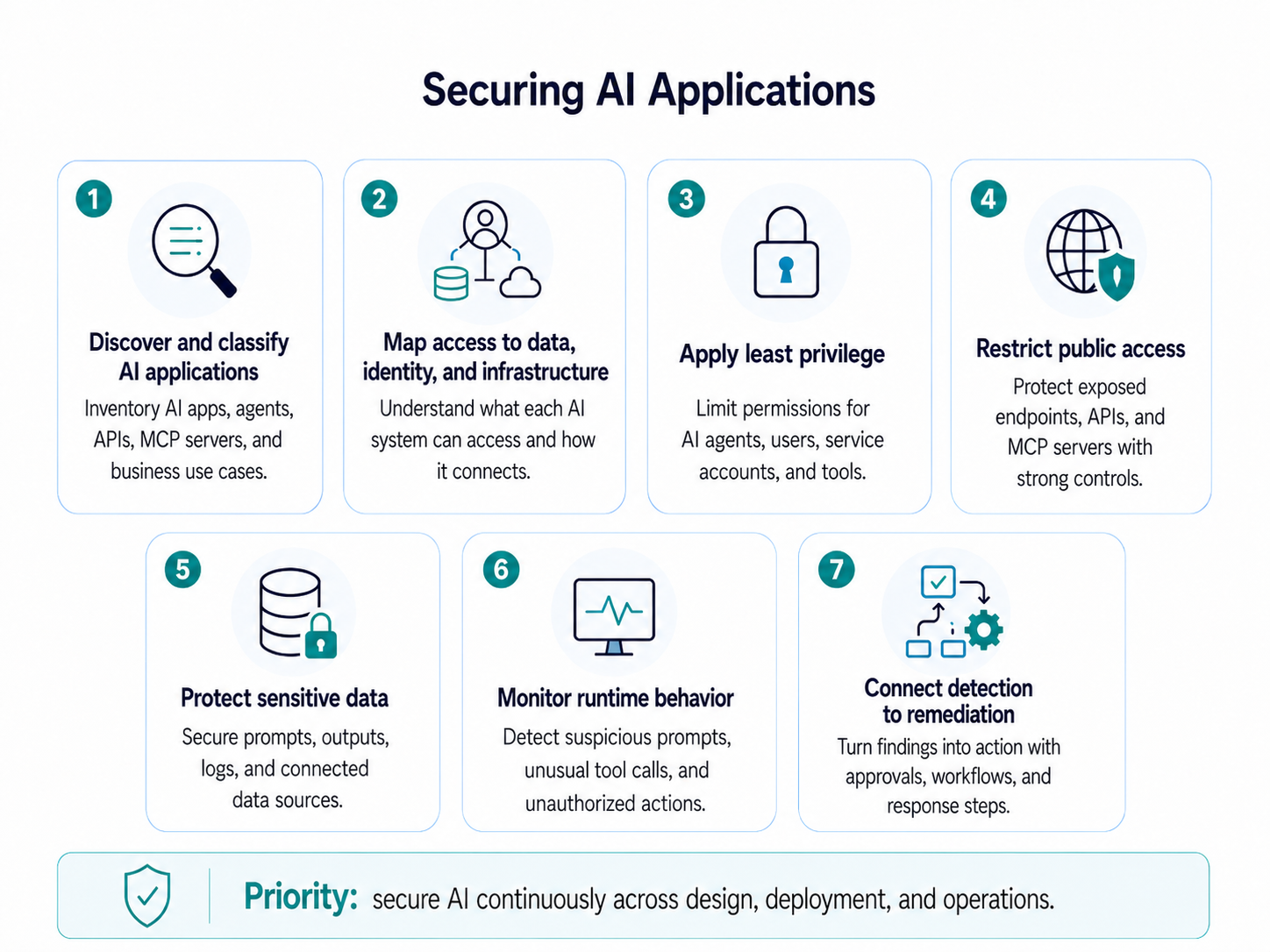
Securing AI applications requires a practical operating model that combines visibility, access control, data protection, runtime monitoring, automation, governance, and continuous remediation.
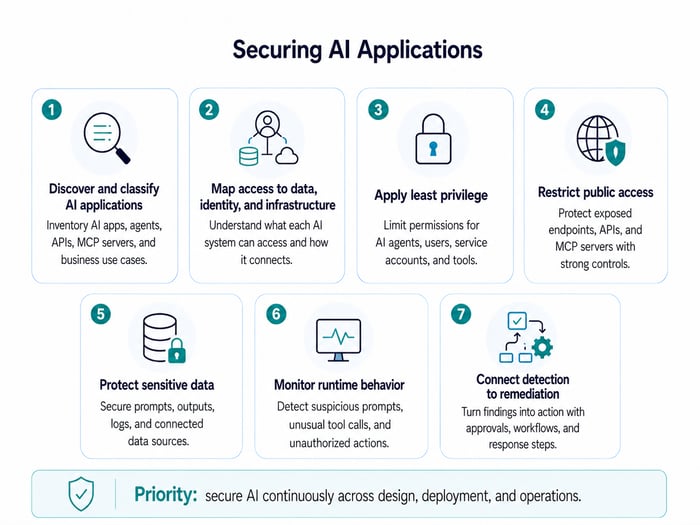 Figure 3: Securing AI Applications
The following steps provide a structured approach to AI security in enterprise environments.
1. Discover and classify AI applications
The first step in securing AI applications is to identify all AI systems across the enterprise. This includes AI agents, model integrations, MCP servers, AI-powered APIs, cloud workloads, business applications, monitoring tools, and operational platforms that use generative AI.
Each AI application should be classified based on its business purpose, data access, exposure, ownership, deployment environment, and operational impact. This helps security teams prioritize the applications that represent the highest risk.
An AI system connected only to public documentation may require fewer controls than an AI agent connected to customer databases, SAP systems, cloud administration tools, vulnerability data, or production workflows.
Classification should also account for how users interact with the AI application. An AI assistant used only for read-only reporting carries a different level of risk than an agent that can create incidents, trigger automation, or initiate remediation workflows.
2. Map AI access to data, identity, and infrastructure
AI application risk depends heavily on what the AI system can access. Security teams should map each AI application to the data sources, identities, permissions, APIs, secrets, endpoints, cloud resources, third-party services, and operational tools it uses. This provides the context needed to understand real risk.
In agentic AI environments, access mapping should include the tools exposed to the AI client. If an MCP server exposes tools for automation, incident creation, reporting, SAP system health checks, user administration, or vulnerability analysis, security teams need to understand who can invoke those tools and under what conditions.
3. Apply least privilege to AI agents and MCP access
Least privilege is foundational control for AI security. By limiting each AI agent, user, service account, and connected tool to only the access it needs, organizations can reduce the impact of prompt injection, misuse, misconfiguration, or compromised credentials.
AI agents should only have access to the tools, systems, and data needed to perform their approved business function. Access should be tied to an authenticated user whenever possible. Actions should be performed on behalf of the user, within their approved tenant, role, and permission boundaries. This helps prevent AI agents from becoming unmanaged privileged pathways into sensitive systems.
MCP servers should also be reviewed carefully because they can extend what an AI application is able to do. Each connected tool should be governed by clear ownership, access policies, approval requirements, and audit logging.
The IT-Conductor Agentic AI MCP server enables AI assistants to become an interface for enterprise operations, allowing users to ask questions, retrieve system details, review security-related findings, and create incidents without manually navigating multiple tools. This kind of access can improve efficiency, but it also reinforces the need for least privilege. Every MCP-exposed tool should be limited to the user’s approved role, business context, and tenant permissions so the AI assistant cannot perform actions the user would not normally be allowed to take.
4. Restrict public access and enforce strong controls
AI endpoints, APIs, and MCP servers should not be publicly accessible unless there is a clear business requirement. When public access is necessary, organizations should enforce authentication, authorization, rate limiting, input validation, monitoring, and logging. High-risk endpoints should be placed behind secure gateways, private networks, or controlled access layers.
A common remediation activity may involve restricting public access to a specific endpoint, validating whether the AI application can reach sensitive data, and ensuring only approved users or services can interact with it.
For MCP-based integrations, organizations should also ensure that authentication does not rely on unmanaged access keys or broad shared credentials. Secure interactive authentication, role-based access, token management, and session controls are important safeguards for reducing exposure.
5. Protect sensitive data across prompts, outputs, and logs
AI applications should be designed with data protection in mind. Organizations should identify sensitive data sources, enforce encryption, reduce unnecessary data access, and prevent sensitive information from being exposed in prompts, responses, logs, and external API calls.
For example, an AI assistant used in SAP operations may be asked to retrieve system health, list SAP Security Notes, analyze CVE-related risks, or summarize open incidents. While these workflows can improve efficiency, they may also surface sensitive details such as system names, vulnerability information, configuration data, user activity, and remediation status. To reduce exposure, organizations should limit what the AI assistant can access, mask sensitive values where appropriate, and ensure prompts, outputs, and logs are protected by the same data security controls applied to other enterprise systems.
6. Monitor runtime behavior and suspicious prompts
Security teams should monitor how AI applications behave while they are running, especially when prompts lead to unusual tool calls, abnormal API activity, unexpected data access, and unauthorized agent actions. Alerts should be generated when AI applications behave outside approved patterns.
Guardrails should also be applied to prevent unsafe behavior. These guardrails may include blocking certain actions, requiring approvals, limiting data retrieval, filtering outputs, or stopping tool calls that violate policy.
7. Connect AI with enterprise remediation workflows
Identifying AI application risks is only useful if the organization can respond quickly and safely. Security teams need a way to turn AI security findings into governed remediation workflows that involve the right owners, approvals, actions, and audit trails.
AI must connect with operational workflows. For SAP-centric organizations, this is where IT-Conductor Maestro becomes relevant as it supports autonomous SAP security operations by helping orchestrate remediation workflows across SAP landscapes.
In SAP environments, security remediation often involves user access issues, excessive privileges, dormant accounts, segregation of duties conflicts, misconfigurations, missing SAP Security Notes, audit findings, and compliance gaps. These activities are often difficult to manage manually because they require coordination between SOC teams, SAP Basis teams, infrastructure teams, application owners, and business stakeholders. Maestro helps streamline these workflows by supporting anomaly detection, predefined response actions, approved remediation processes, and audit visibility.
For example, when suspicious SAP or SAP HANA user activity is identified, Maestro can support faster remediation by triggering predefined actions while preserving governance and audit traceability. For system anomalies and misconfigurations, it can help detect issues, initiate remediation workflows, apply approved configuration changes, and restart impacted services when necessary.
In the broader discussion of AI application risks, enterprise security is not only about detecting issues, but also about turning those findings into coordinated, governed response. As AI applications become more connected to business systems, organizations need orchestration layers that can support remediation safely, consistently, and with human oversight where required.
Building a stronger AI security strategy
Securing AI applications requires more than traditional application security. Organizations need a practical AI security strategy that covers visibility, data protection, least privilege, prompt monitoring, runtime behavior, governance, and remediation.
As AI agents become more connected to cloud systems, SAP environments, APIs, databases, monitoring platforms, and business workflows, organizations need stronger controls over what they can access and what actions they can perform.
By discovering AI applications, mapping access, restricting exposure, protecting sensitive data, monitoring suspicious behavior, enforcing role-based access, and connecting risks to remediation workflows, organizations can reduce AI security risks while still enabling innovation.
Frequently Asked Questions