SAP monitoring
What to Monitor when you are Not Monitoring SAP
SAP Monitoring the simple way WITHOUT SAP Solution Manager
URL and website monitoring aren't the same. For IT and SAP teams, using the wrong one means outages go undetected. Here's what you need to know
Picture this scenario. A critical SAP portal goes dark in the middle of a business day. Users are trying to access Fiori apps, and they’re met with blank screens or timeout errors, and web services that downstream processes depend on have quietly stopped responding. By the time the first helpdesk ticket lands, there are already plenty of frustrated users, broken workflows, and productivity is lost.
This is exactly why understanding the difference between URL monitoring and website monitoring matters. The two are often treated as interchangeable, but they serve fundamentally different purposes, different audiences, and different definitions of "something is wrong." Reaching for the wrong tool doesn't just mean a gap in visibility. It means the problems that matter most to your operations go undetected.
In this blog post, we’re going to break down what each approach actually does, where they differ, and how IT teams can make sure they're covered.
When most people hear "website monitoring," they're thinking about tools built for marketers, SEO managers, and content teams. The people responsible for how a public-facing website performs in search results and for visitors. Website monitoring tools crawl your website and track things like broken links, page load speed, Core Web Vitals, content changes, and keyword rankings.
The intended audience shapes everything about how these tools are designed. A marketing manager wants to know if a landing page is loading slowly, if a blog post has dropped in rankings, or if a recent site update accidentally broke navigation. They're optimizing for the visitor experience and search engine visibility, but not for operational uptime. That's a valuable set of problems to solve, but it's a fundamentally different one than what IT teams face.
URL monitoring is about operational availability. It continuously checks whether a specific URL or web endpoint is reachable, returning the correct response, and performing within acceptable thresholds.
Where website monitoring gives you a broad picture of your site's health, URL monitoring is targeted and real-time. Key metrics include HTTP/HTTPS status codes, response time and latency, SSL/TLS certificate validity and expiry, uptime percentage, HTTP method support (GET, POST, DELETE, PUT), and multi-location availability checks.
This is the monitoring that tells you that something is broken before your users do.
At first glance, both approaches sound like they're doing the same thing: keeping an eye on URLs. But the intent behind each one is completely different, and that gap becomes very apparent when something goes wrong in an enterprise environment.
The clearest way to distinguish the two is by the question each one answers:
|
Dimension |
Website Monitoring |
URL Monitoring |
|---|---|---|
|
Primary audience |
Marketers, SEO teams |
IT ops, sysadmins, MSPs |
|
Focus |
Visibility & content health |
Availability & response integrity |
|
Depth |
Full-site crawl |
Targeted endpoint checks |
|
Alerting |
Trend-based reports |
Real-time, threshold-based alerts |
|
Typical environment |
Public websites |
Apps, portals, APIs, SAP services |
Table 1: Core differences between website monitoring and URL monitoring
For IT and SAP teams, the operational column is what matters. Whether it's an SAP Fiori launchpad, an internal web service, or a third-party API integration, you need to know the moment something stops working. Not the next time a crawler runs or a weekly report lands in your inbox.
URL monitoring isn't a standalone tool. It's a core component of a broader IT monitoring strategy, sitting alongside infrastructure, network, and application monitoring. For IT and SAP teams specifically, the use cases go deeper than simply checking whether a page loads:
SAP portals and Fiori apps: Continuously verify that SAP-facing web services and launchpads are reachable and returning valid responses, so issues are caught before they impact end users or disrupt business processes.
Third-party API integrations: Monitor external endpoints your systems depend on (payment gateways, logistics APIs, identity providers) to detect failures in integrations that don't produce obvious errors until something downstream breaks.
SSL certificate expiry: Proactively track certificate validity so you're never caught off guard by an expiry that takes a service offline or triggers browser security warnings for users.
Multi-location availability checks: Detect regional outages or routing issues by checking endpoint availability from multiple geographic locations. This is critical for globally distributed teams and customers.
Maintenance windows and SLA alignment: Schedule monitoring checks to align with your operational cadence, ensuring you're capturing meaningful uptime data without generating noise during planned downtime.
Response validation: URL monitoring can verify that endpoints are returning the right HTTP status codes and responding within acceptable time limits, flagging degraded or partially broken services before they escalate into full outages
The real value of URL monitoring is realized when it is embedded within a unified operations platform rather than treated as a standalone tool. When endpoint health, SAP system availability, infrastructure performance metrics, and automation workflows are consolidated into a single operational view, teams eliminate blind spots and reduce diagnostic time. Instead of jumping between disconnected tools and piecing together alerts after users report issues, IT operations gain immediate context and correlation across systems. This shift transforms monitoring from reactive firefighting into proactive control, enabling faster incident resolution, improved service reliability, and measurable alignment with business SLAs.
Yes, but for different teams and different purposes. A large enterprise might have a marketing team using website monitoring to manage their public site's SEO health, while the IT team uses URL monitoring to track the availability of applications and services. These are complementary, not competing.
The key is not conflating the two. Using a website monitoring tool to watch your SAP portal is like using a stethoscope to check if a door is locked. Wrong instrument for the job.
When evaluating your monitoring needs, start by asking who the primary consumer of the monitoring data is. If it's a marketing or content team, a website monitoring tool is likely the right fit. If it's IT operations, sysadmins, or an MSP managing enterprise systems, you need URL monitoring built for that context.
For IT teams, IT-Conductor's URL monitoring is purposefully built for this environment. It lets you configure HTTP probes against specific endpoints with full control over HTTP method (GET, POST, DELETE, PUT, HEAD), allowed status codes, redirect behavior, connection timeouts, and SSL certificate enforcement. Probes are tied to customizable schedules and time windows, so monitoring aligns with your operational cadence and SLA requirements.
Unlike generic monitoring tools, IT-Conductor’s URL monitoring is purpose-built for enterprise IT operations. It goes beyond simple uptime checks by offering deep configurability, SLA-aware scheduling, and tight integration with SAP and infrastructure monitoring workflows. Teams can define precise HTTP probes, control acceptable status codes, enforce SSL certificate validation, and align monitoring windows with business hours or maintenance periods. Because it operates within the same unified platform as SAP system monitoring, infrastructure oversight, and automation, URL health is never viewed in isolation. Instead of juggling multiple dashboards or reacting to fragmented alerts, IT teams gain a consolidated, real-time operational view that enables faster root-cause analysis, proactive issue resolution, and stronger SLA compliance across their enterprise landscape.
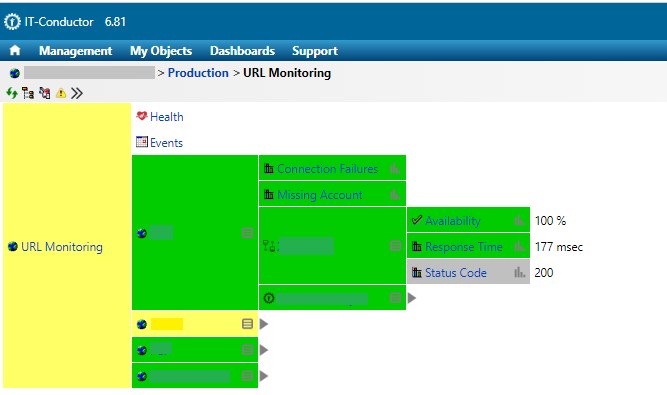
Because URL monitoring in IT-Conductor sits within the same platform as SAP monitoring, infrastructure monitoring, and automation, teams get a unified operational view rather than yet another siloed tool to manage.
You can read more about configuring URL monitoring in IT-Conductor's documentation.
Overall, choosing the right monitoring tool isn't just about picking the most feature-rich option. It's about matching the tool to the problem it's actually meant to solve.
Website monitoring and URL monitoring each do their job well, but only when they're applied to the right context. For IT and SAP teams, that means putting operational availability front and center, with monitoring that's built for endpoints, services, and enterprise environments, not traffic dashboards and search rankings.
Don't wait for your users to tell you something is broken. With the right URL monitoring in place, you'll know first.
SAP Monitoring the simple way WITHOUT SAP Solution Manager
Version 4 of our SAP & HANA Monitoring Tools Comparison including BMC, Tivoli, SCOM, AppDynamics, Dynatrace and Nagios XI
SAP LT Replication Server Monitoring (SLT Monitoring) included in SAP Netweaver Monitoring