Addressing vulnerabilities in SAP environments can take days, weeks, or even months, from detection to remediation. Teams already struggle to keep up with known vulnerabilities, and the challenge will only grow as AI helps attackers discover weaknesses, develop exploits, and identify new attack paths faster.
Organizations need to prepare before the gap between attack and defense widens. Building a more continuous and autonomous security approach can help teams respond at the speed required as threats become increasingly AI-driven.
In the seventh session of the Rise of SAP Autonomous Cyber Operations webinar series, IT-Conductor CEO Linh Nguyen and co-founder and CTO David Stavisski discussed how AI agents use system-specific evidence, specialized tools, and defined governance to support SAP security operations. Later in the session, they demonstrated how these agents can help teams analyze vulnerabilities, prioritize risks, and move toward resolution more autonomously while keeping humans in control over high-impact actions.
Where do AI agents add value to SAP security operations?
AI agents add value to SAP security operations by helping SAP teams move from collecting security data to understanding what matters and taking the appropriate action.
SAP teams already work with information from many sources, including CVEs, SAP Security Notes, installed components, profile parameters, audit logs, alerts, database (DB) status, operating system (OS) events, incidents, and change records. Having access to all this information does not automatically make it easier to understand risk.
The webinar presented this challenge into five activities:
(1) Collect > (2) Correlate > (3) Judge > (4) Explain > (5) Act
Many security tools are effective at collecting and presenting findings. The difficult part is bringing context to evidence from different sources, determining what applies to the environment, and deciding what should happen next. We discussed this framework in greater detail during our previous webinar on moving from detection and analysis toward coordinated remediation.
AI agents can carry more of this process autonomously by examining the available evidence, correlating data to provide context, judging the relevance and severity of each condition, explaining why it matters, and recommending an appropriate response. Instead of waiting for the next scheduled review, AI agents can continuously evaluate security data and help teams respond as system conditions and security risks change.
Does autonomy in SAP security operations mean giving AI agents full control?
Autonomy in security operations does not mean giving AI unrestricted control over SAP environments. AI agents can propose and coordinate actions, but organizational policies still determine what is permitted. Humans retain authority over high-impact decisions, while AI agents carry out approved steps through controlled, repeatable, and auditable automated processes.
What makes an AI agent different from traditional automation?
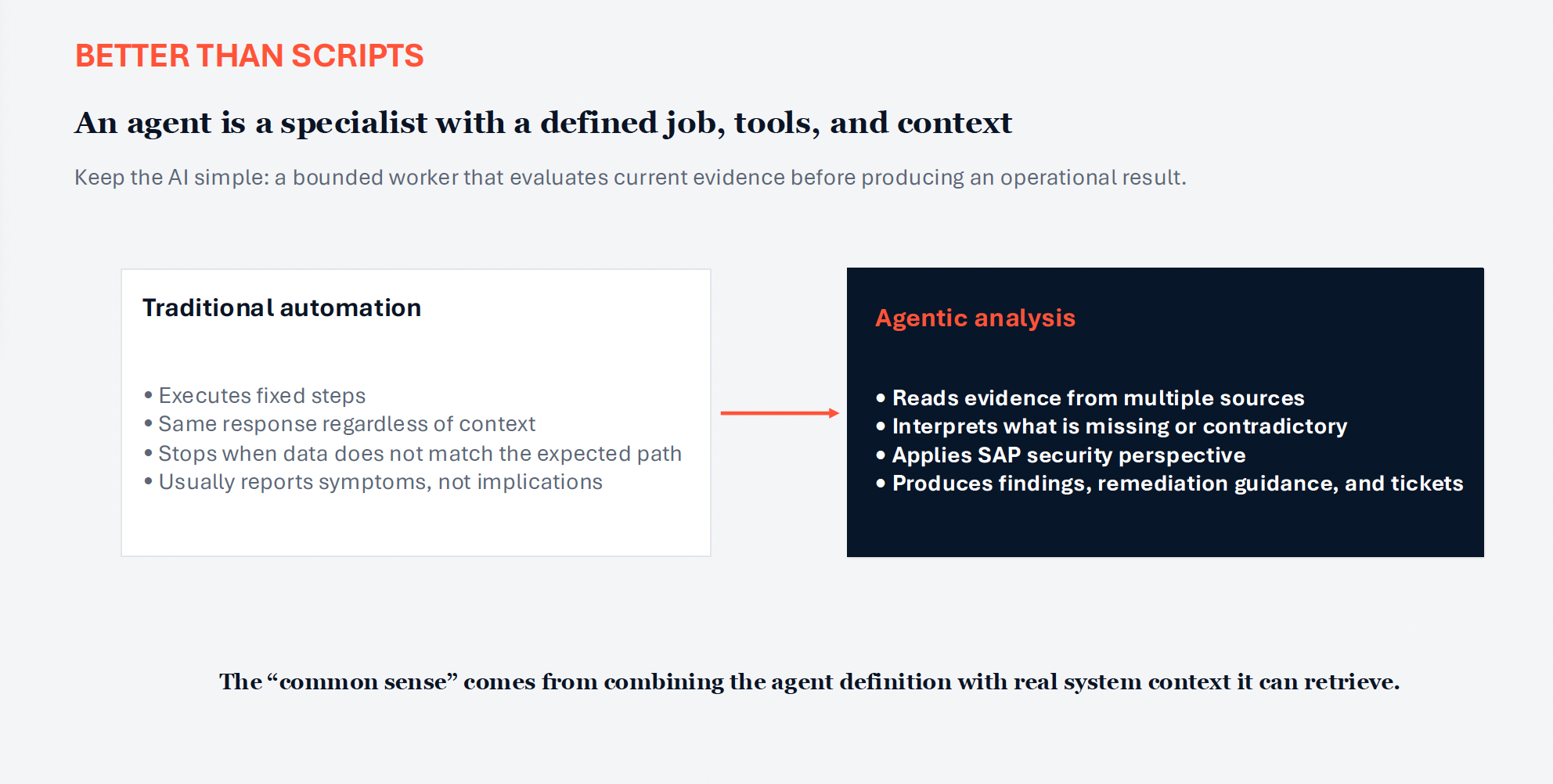
Traditional automation follows predefined instructions. It expects known inputs, carries out fixed steps, and produces a predictable result. When the data falls outside the expected path, the process may stop and require human intervention.
AI agents work differently because they evaluate the context available at the time of analysis. An agent can read evidence from multiple sources, interpret relationships between findings, and adjust its output based on the current condition of the system.
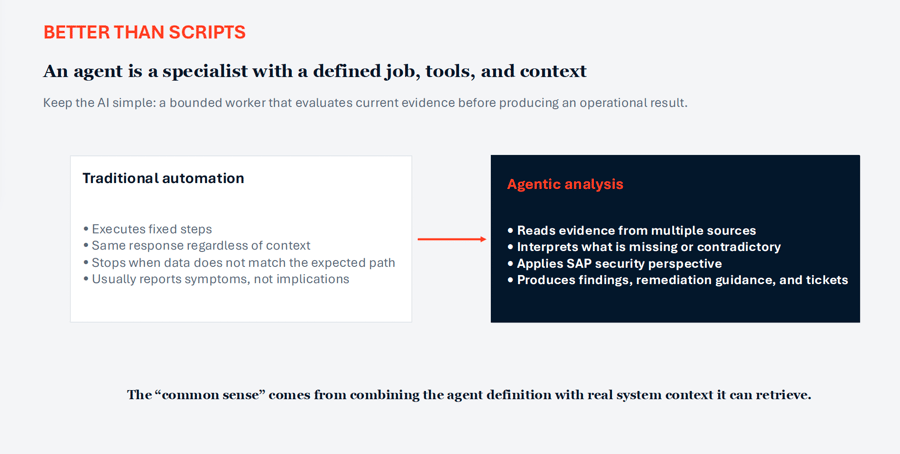 Figure 1: Traditional Automation vs Agentic Analysis
During the webinar, an agent was described as a specialist with a defined job, approved tools, and relevant context. A vulnerability agent, for example, may be responsible for determining whether a CVE or SAP Security Note applies to an installed system. A configuration agent may focus on active parameters and deviations from a secure baseline.
The agent’s value does not come from the language model alone. It also depends on the instructions it receives, the evidence it can retrieve, and the boundaries placed around its role. Without current system context, an agent cannot reliably determine whether a finding poses a real risk to a particular SAP environment.
Bringing context to security evidence across the SAP environment
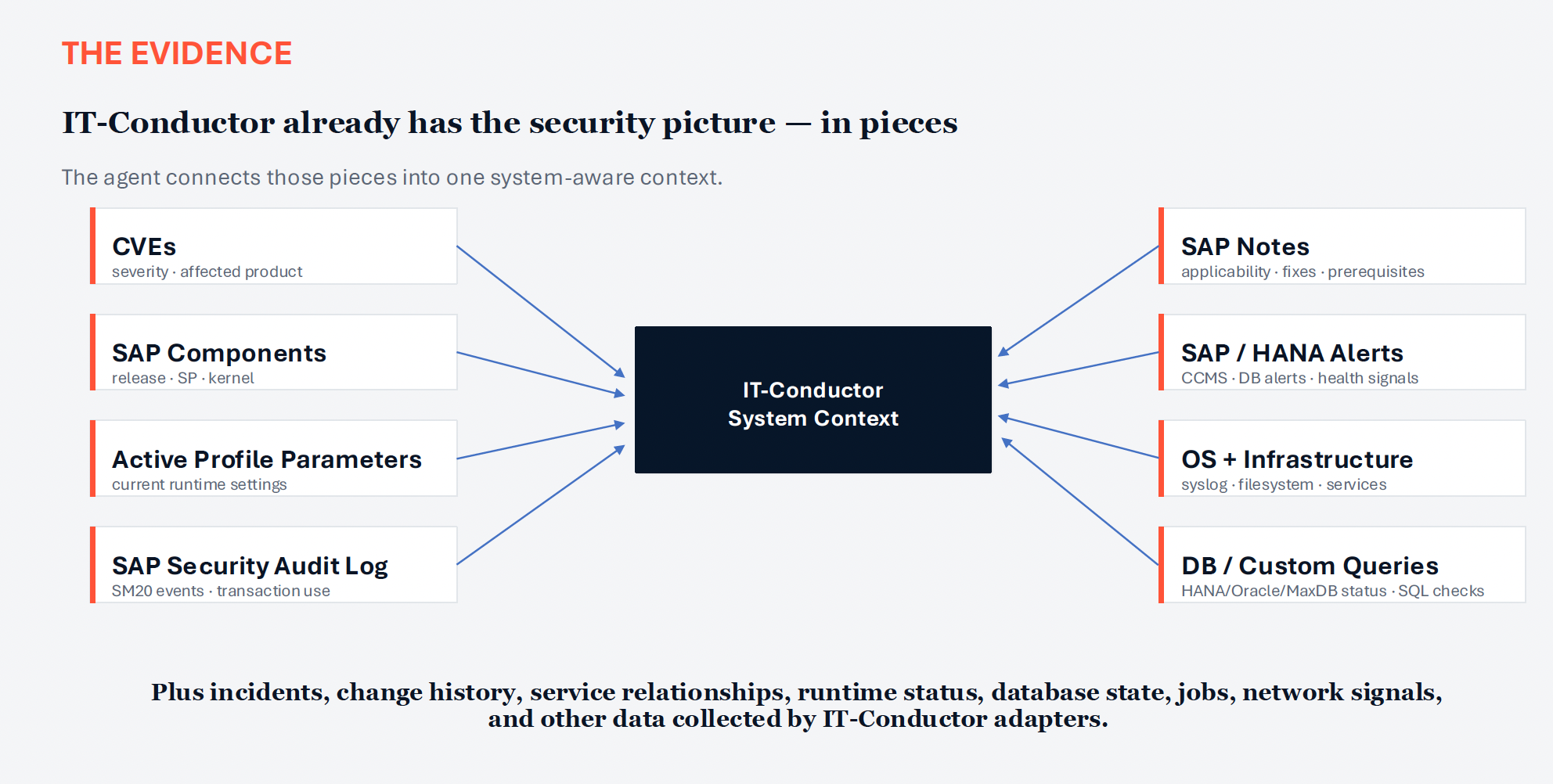
IT-Conductor already collects different parts of the security picture through its adapters and operational data, including:
- Common Vulnerabilities and Exposures (CVEs)
- SAP Security Notes
- Installed SAP components, releases, support packages, and kernels
- Active profile parameters
- SAP Security Audit Log events
- SAP and HANA alerts
- OS and infrastructure signals
- DB and custom-query results
- Incidents, changes, service requests, jobs, etc.
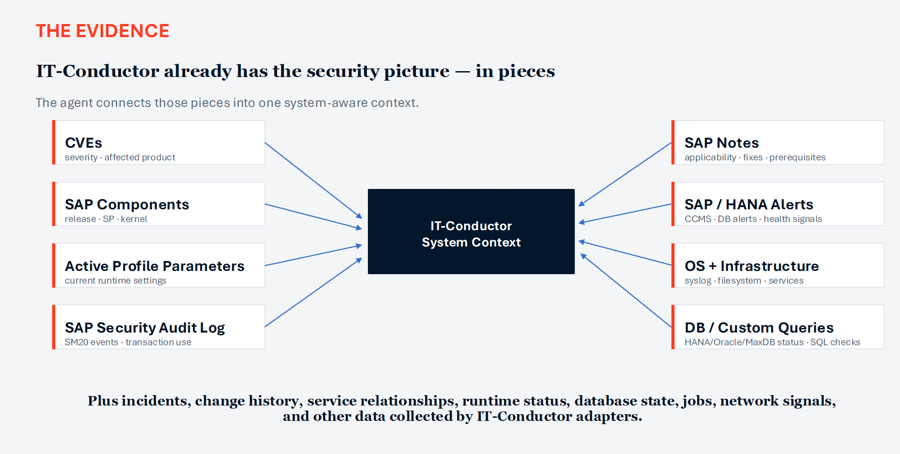 Figure 2: IT-Conductor System Context as Security Evidence
Bringing these sources into one system-aware context gives AI agents the evidence needed to evaluate relationships between findings. Instead of analyzing each signal in isolation, agents can consider what is installed, how the system is configured, what activity has occurred, and whether other layers of the environment support the same concern.
How do AI agents analyze the same evidence from different perspectives?
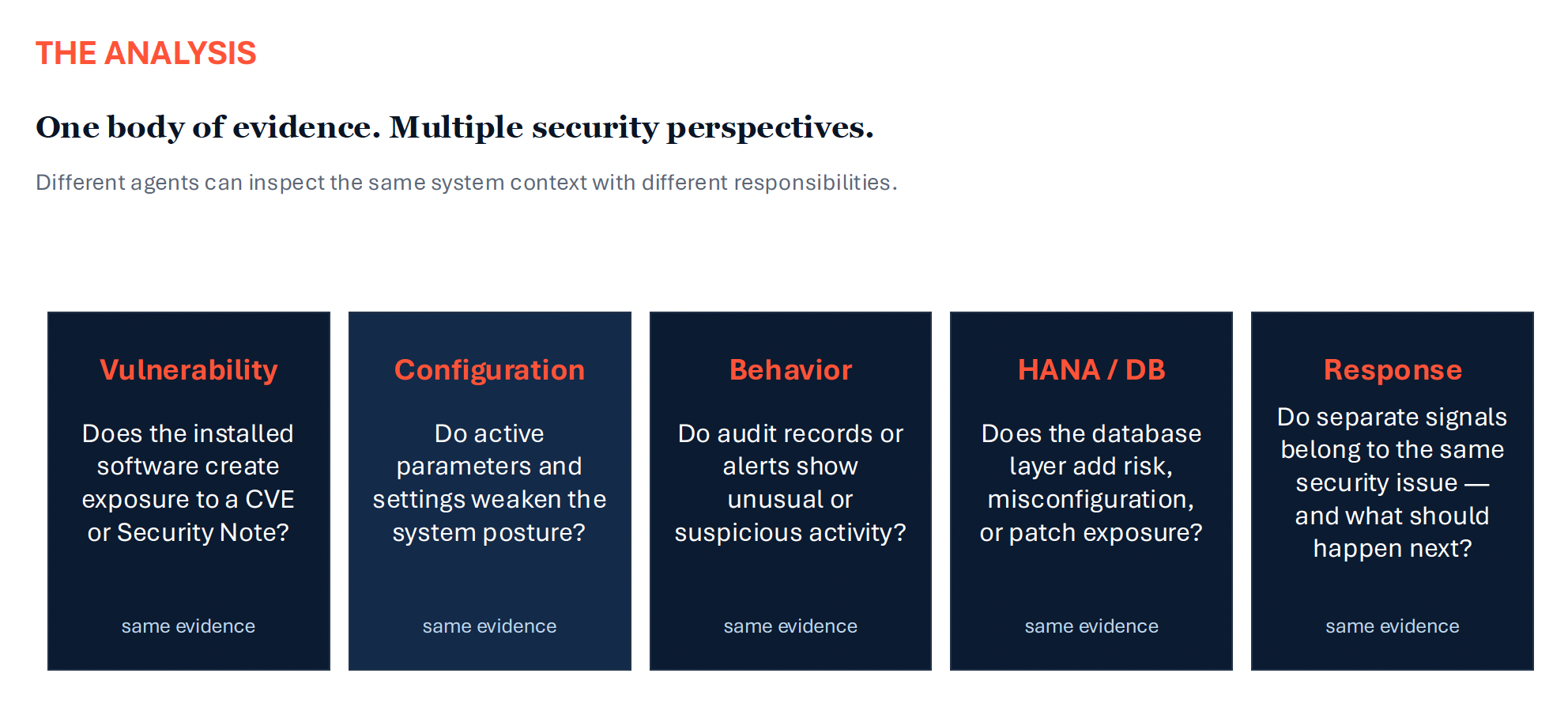
Once the available evidence is brought into a shared context, specialized AI agents can analyze it from different security perspectives. Each agent focuses on a defined responsibility and ask different questions of the same data.
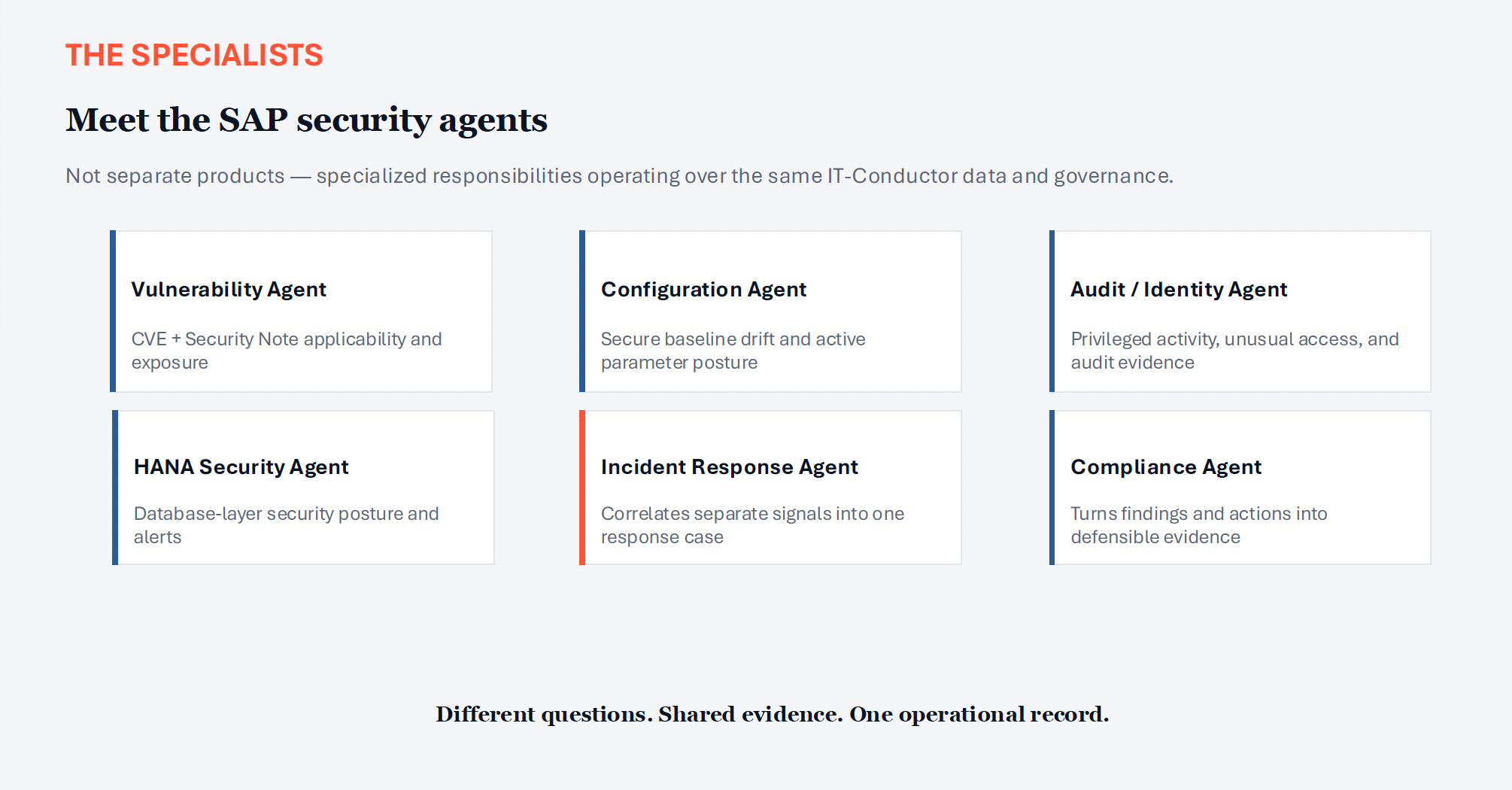
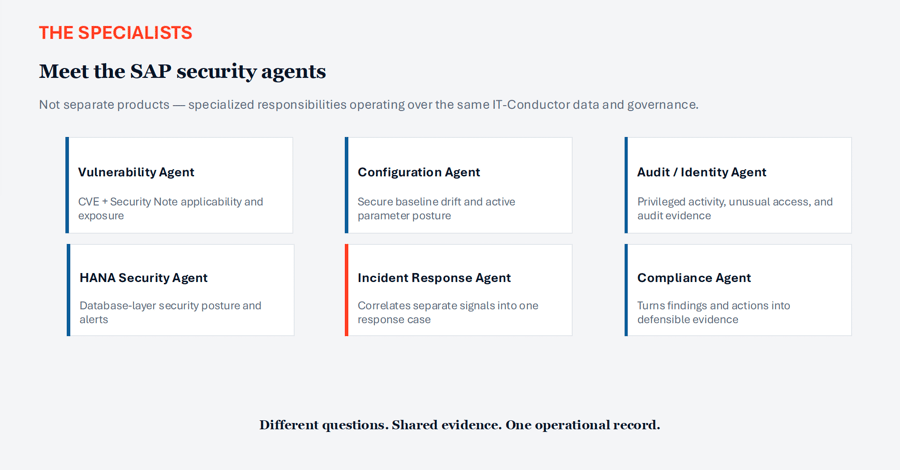 Figure 3: SAP Security Agents
- Vulnerability Agent can determine whether installed software creates exposure to a CVE or SAP Security Note.
- Configuration Agent can identify active settings that have drifted from a secure baseline.
- Audit or Identity Agent can examine privileged activity and unusual access.
- HANA Security Agent can assess database-layer alerts, configuration, and patch posture.
- Incident Response Agent can then determine whether separate signals relate to the same security issue and recommend what should happen next.
- Compliance Agent can document the finding, supporting evidence, recommended action, and validation results.
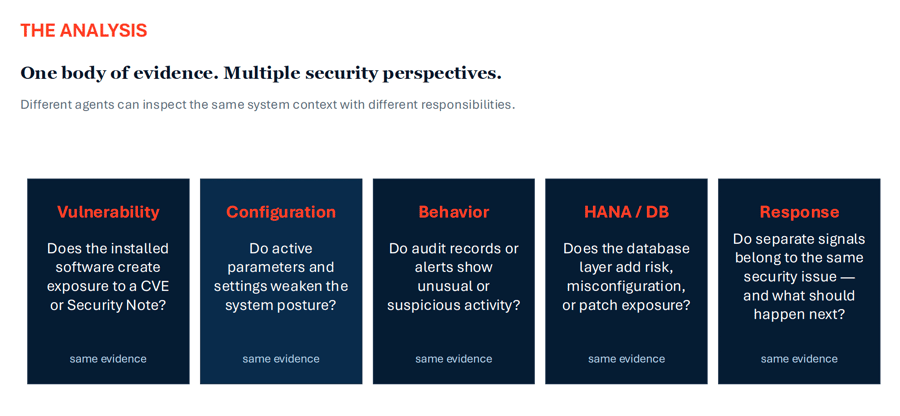 Figure 4: Security Analysis using AI Agents
These agents do not work with entirely separate datasets, but rather asking different questions using the same evidence. This helps teams develop a more complete understanding of an issue, including how different findings may be related, why the risk matters, and what actions should be prioritized.
Example 1: Vulnerability intelligence
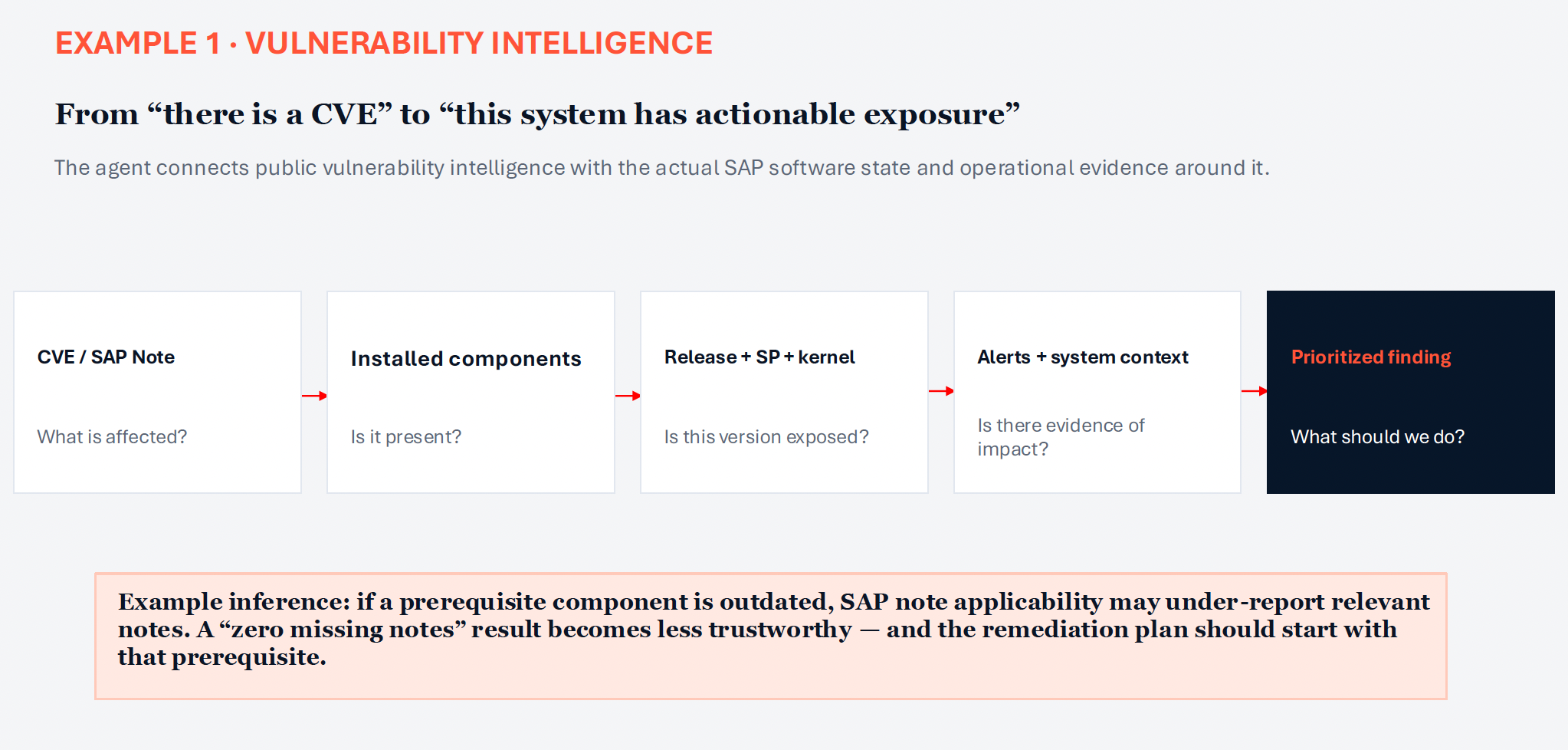
Vulnerability intelligence is one area where understanding the relationships between findings becomes particularly important. As Linh discussed in the first example, a published CVE or SAP Security Note may identify an affected product, but it does not automatically confirm that a specific SAP system is exposed.
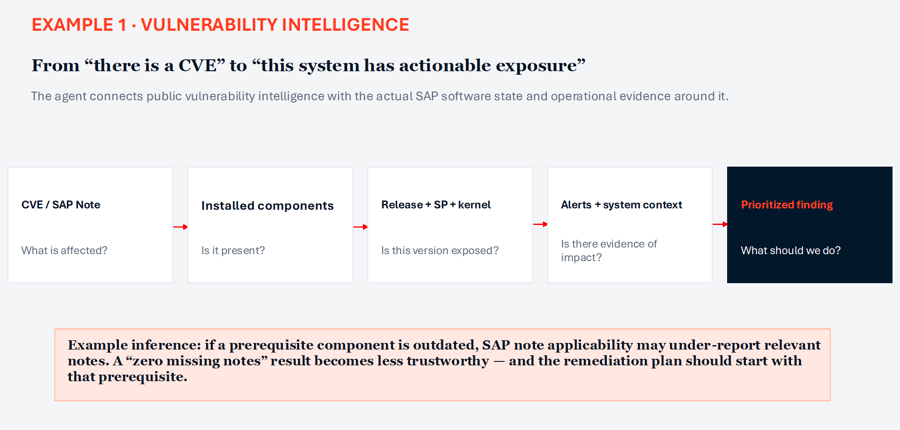 Figure 5: Vulnerability Intelligence
An AI agent can compare the vulnerability information with the components installed in the environment, including their releases, support package levels, and kernel versions. It can then evaluate related alerts and system context to determine whether the vulnerability applies to a specific system, assess its potential impact, and establish how urgently it should be addressed.
The analysis must also account for conditions that could affect the reliability of the results. For example, an outdated prerequisite component may cause an SAP Note applicability check to under-report relevant notes. Even when the check shows no missing notes, the system may still have an unresolved exposure. An AI agent can identify the outdated prerequisite, explain how it affects the assessment, and recommend addressing it before relying on the result.
Continuous monitoring is equally important because relevant vulnerabilities are not limited to those included in the monthly SAP Security Patch Day release. New vulnerabilities may be disclosed between monthly updates. By monitoring SAP Notes alongside independent vulnerability intelligence and the system’s current software state, an AI agent can identify and begin tracking newly relevant exposures without waiting for the next scheduled review.
Example 2: Configuration and behavior
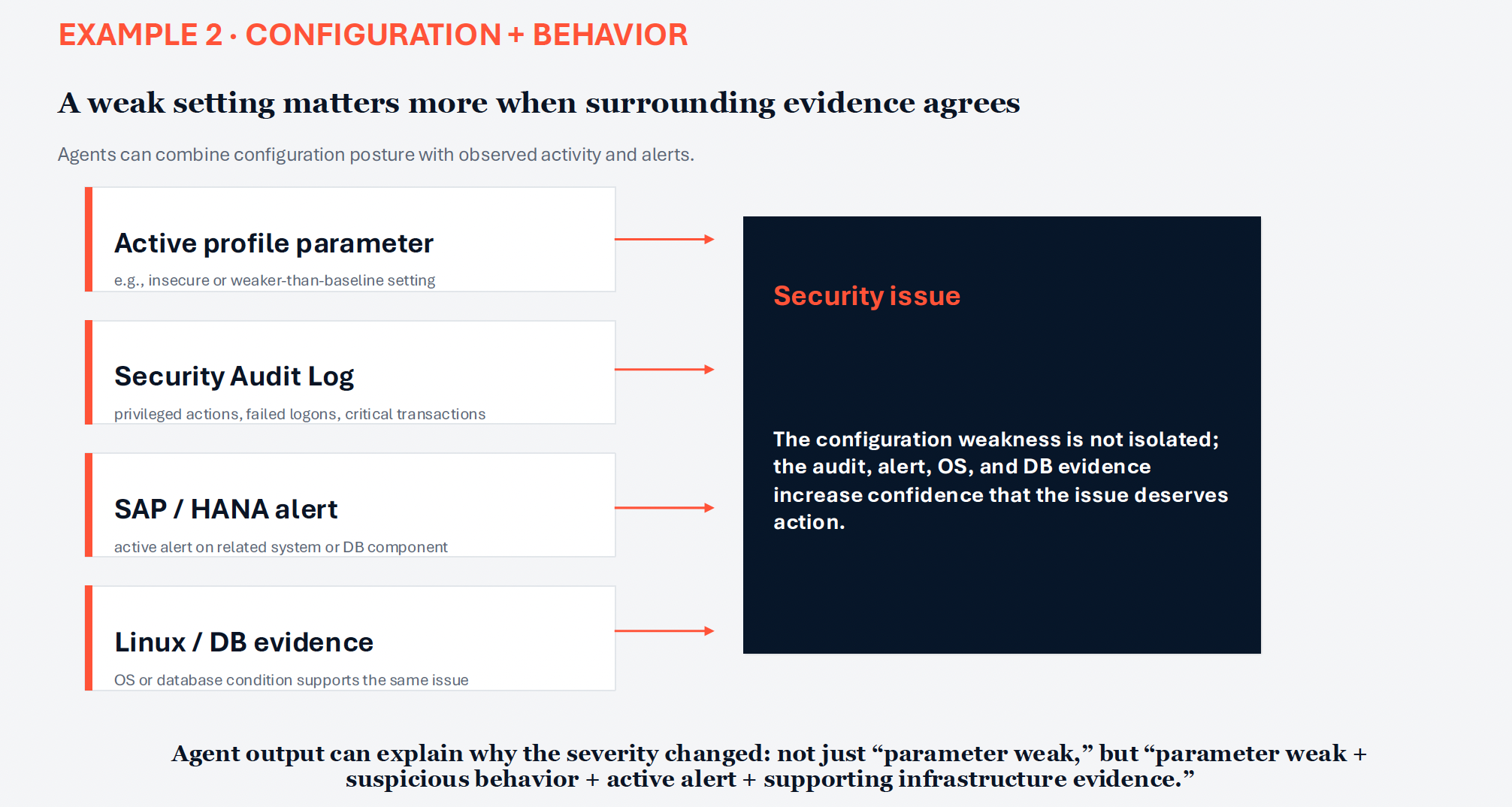
In the second example presented, Linh discussed how AI agents can apply the same contextual analysis to configuration settings and observed system behavior.
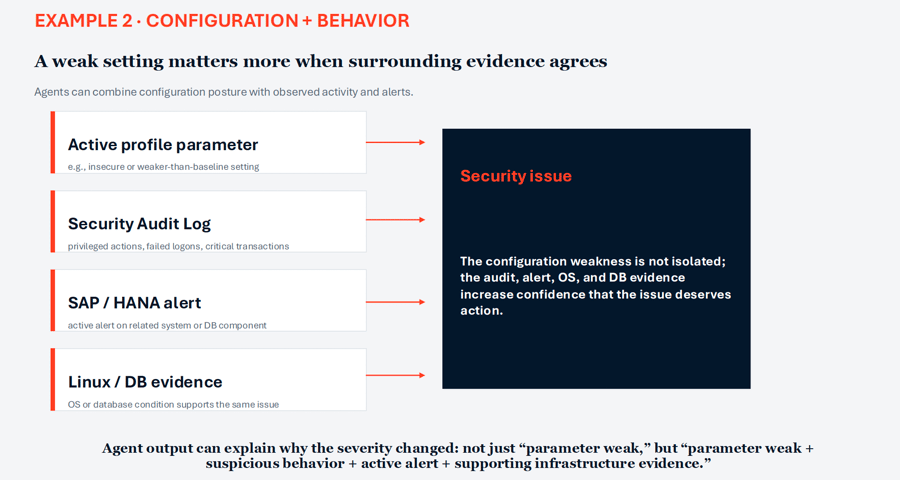 Figure 6: Configuration and Behavior
A weak profile parameter may initially appear to be an isolated compliance issue. However, its urgency can increase when the SAP Security Audit Log also shows privileged activity, repeated failed logon attempts, or the use of critical transactions. Related SAP or HANA alert, OS event, or database conditions may provide further evidence of potential risk.
Instead of reporting only that a parameter does not meet the security baseline, an AI agent can evaluate the surrounding evidence and explain why the condition may require immediate attention. Teams can then understand that the finding is not based on a single configuration weakness, but on several related signals that may point to a broader security issue.
This cross-layer analysis is particularly relevant to SAP because security issues do not always remain within the application boundary. The first visible symptom may appear in SAP, while the underlying cause involves the database, operating system, network, or a recent system change. Analyzing these sources together helps teams see relationships that may otherwise remain hidden across separate tools and areas of responsibilities.
How do AI agents turn security analysis into action?
Following the vulnerability and cross-layer configuration examples, the discussion turned to how AI agents can translate their analysis into clear, actionable findings. Identifying a risk is only useful if the result gives security and operations teams enough information to understand the issue and act on it.
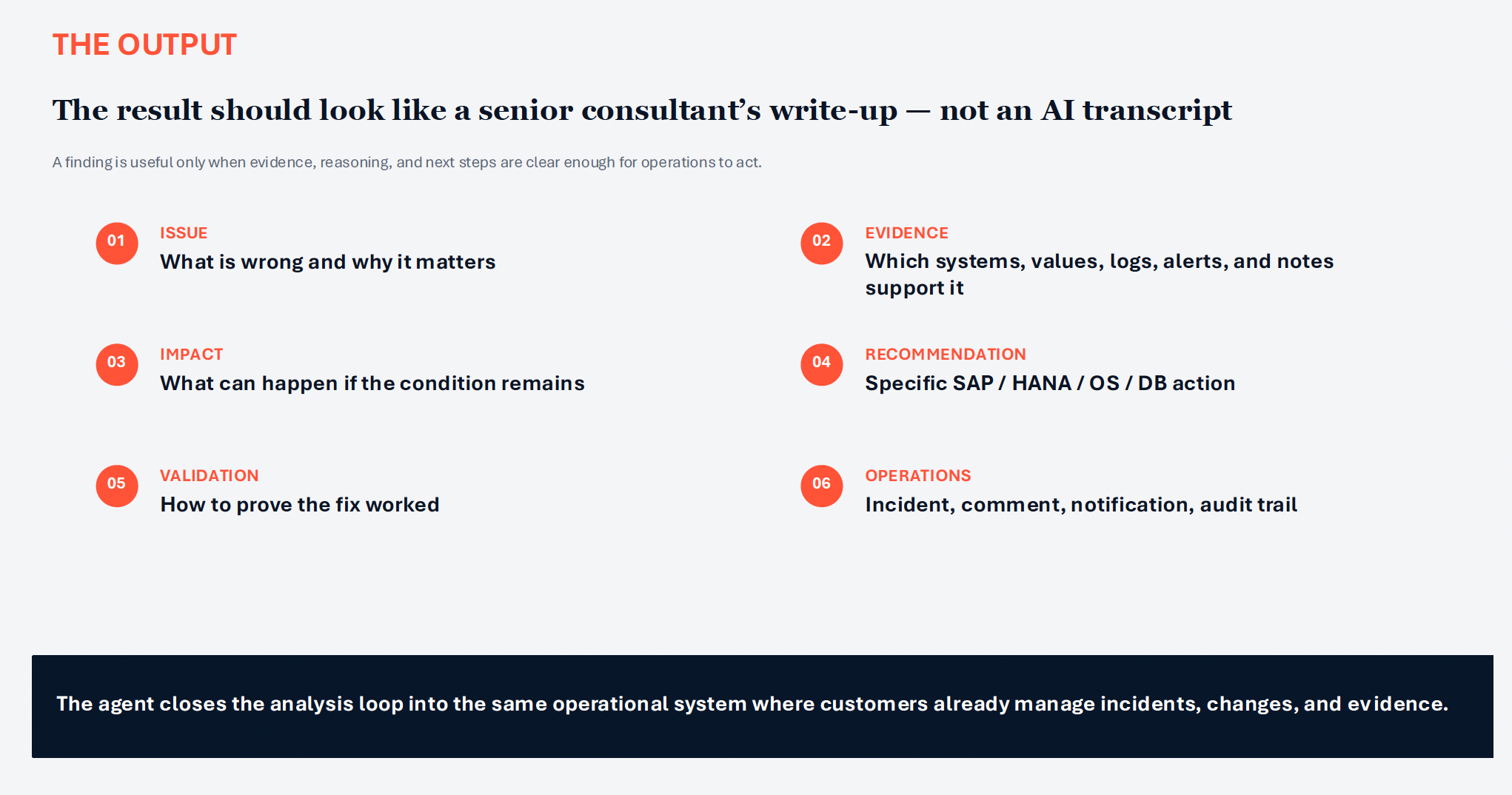
As emphasized in the presentation, the output should resemble a senior consultant’s assessment rather than a transcript of an AI interaction.
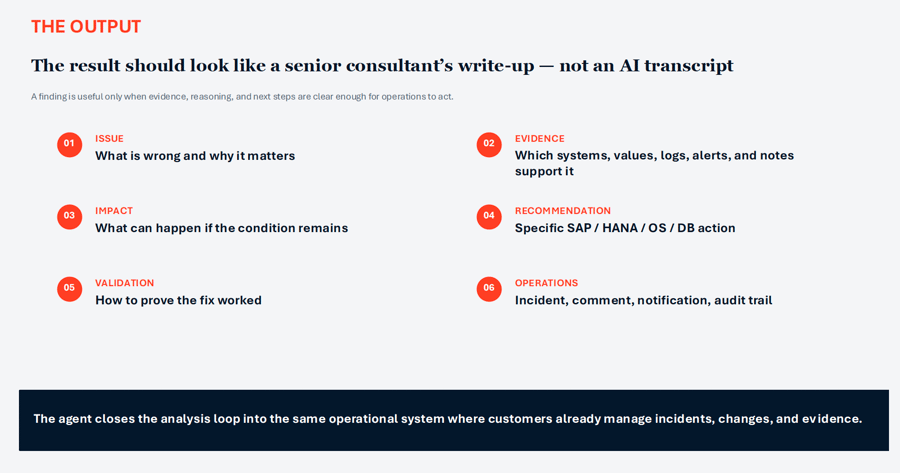 Figure 7: What security analysis output should include
Each finding should clearly communicate:
- Issue: What is wrong and why it matters
- Evidence: Which systems, values, logs, alerts, or SAP Notes support the finding
- Impact: What could happen if the condition remains unresolved
- Recommendation: The specific SAP, HANA, operating system, or database action required
- Validation: How teams can confirm that the remediation worked
- Operations: The related incident, comment, notification, and audit trail
The analysis can then feed into the same operational environment where teams already manage incidents, changes, approvals, and supporting evidence. Instead of leaving teams to interpret the result and manually recreate it in another tool, the agent helps carry the finding into a governed workflow with its evidence, reasoning, recommended action, and validation requirements intact.
Read related post: The Economics of Cybersecurity: A Case Study on SAP Cybersecurity Resilience
Every agent works inside the same governance model
Governance remained a central theme throughout the webinar. Every agent should operate within the same governance model, with defined boundaries around the data it can access, the tools it can use, and the actions it can initiate.
Agents analyze information that IT-Conductor has already collected and normalized, so they do not require a new or unrestricted data path into the SAP environment. They should access this evidence only through named platform tools designed for specific functions — not arbitrary shell commands, external URLs, or unapproved connections.
The resulting findings also remain within normal operational objects, such as incidents, comments, and notifications. This keeps the agent’s analysis, recommendations, and subsequent actions reportable and auditable through the same processes teams already use.
Human approval remains in place where it matters most. Agents can begin with read-only analysis and recommend the appropriate response, while remediation actions remain subject to established approval gates. Security professionals can review the evidence and reasoning before authorizing any change that could affect the system.
Organizations can see what information the agent analyzed, which tools it used, what it recommended, and when human approval was required.
Scaling SAP security expertise with AI agents
The most important takeaway from the webinar is that AI agents can help SAP security teams scale their ability to interpret evidence and coordinate action. Their purpose is not to replace the people responsible for SAP security operations.
Their value comes from bringing SAP, HANA, database, operating system, infrastructure, and vulnerability evidence into one context. Agents can examine that context from different security perspectives and produce prioritized findings with clear remediation and validation guidance.
When the analysis feeds governed workflows, organizations can move from a fragmented collection of findings toward a continuous cycle of detection, decision, remediation, validation, and evidence. Humans remain responsible for high-impact decisions, while agents handle more of the repetitive work involved in connecting information, explaining risk, and preparing the next action.
For teams facing growing security data, limited specialist capacity, and faster-moving threats, AI agents offer a way to prepare for what comes next while improving how SAP security risks are managed today. See it in action.