SAP security teams rarely struggle to find another alert. Security scanners, SAP Security Notes, CVE feeds, audit logs, and monitoring platforms continuously surface vulnerabilities and suspicious activity. The harder work begins after detection: determining which findings apply to a specific SAP landscape, deciding which ones matter most, assigning the right owners, and completing remediation before the backlog grows.
In this sixth session of the Rise of SAP Autonomous Cyber Operations webinar series, IT-Conductor CEO and Co-Founder Linh Nguyen explored how organizations can bring detection, decision-making, to remediation together within a single governed lifecycle. Through practical frameworks and live demonstrations, the session showed how SAP-aware context, agentic AI, automation, and orchestration can help teams move from a growing list of findings to validated risk reduction.
Why remediation backlogs keep growing
Organizations already have many ways to identify vulnerabilities, configuration gaps, access risks, and suspicious activity. SAP also publishes Security Notes and vulnerability information that teams can assess against their environments. As Linh emphasized, however, increasing the volume of detection does not automatically lead to faster remediation.
Every new finding creates a series of operational questions. Does it affect a component the organization actually uses? Is the vulnerable service active or exposed? Which business processes depend on the system? How difficult will the fix be to test and deploy? Will it require downtime, business approval, or a broader upgrade?
Answering those questions often requires input from security, Basis, infrastructure, and functional teams. When the process depends on meetings, manual research, disconnected tickets, and unclear ownership, teams can spend more time deciding what to do than reducing the exposure itself.
Linh described the result as analysis paralysis. A team may detect 20 issues but act on only a few while the others wait for technical review, business input, testing decisions, or change approval. New findings continue to arrive during that delay, and the remediation backlog keeps expanding.
Five questions to ask when making an environment-specific decision
To move beyond a generic list of findings, the webinar introduced five questions teams should ask about every issue.
- Does it affect our landscape? Start by determining whether the finding applies to components, versions, services, or configurations actually present in the environment. A high-severity vulnerability may have little immediate relevance if the affected component is not deployed or the vulnerable service is inactive or inaccessible.
- How serious is the risk? Published severity is only a starting point. Internet exposure, exploitability, system criticality, available attack paths, compensating controls, and the business processes supported by the system can all increase or reduce the actual risk within a specific environment.
- Should remediation be automated? Repeatable, well-understood changes with established testing, validation, and rollback procedures may be good candidates for automation. Higher-impact or less predictable changes may require a manual or hybrid approach, particularly when business context or technical judgment is needed.
- Is human approval required? Human approval becomes more important when a change could affect critical systems, business processes, availability, or compliance requirements. Routine remediation may proceed through predefined workflows, while higher-impact changes can be routed to the appropriate technical or business owner before execution.
- How do we safely rollback if necessary? Every remediation plan should define how the environment can be returned to a known good state if post-change validation identifies a problem. The rollback approach should be established before execution and aligned with the type and scope of the change.
These questions shift prioritization from published severity to environment-specific risk. A medium-rated vulnerability in a critical, exploitable production system may demand faster action than a critical issue affecting an unused component. Teams must also weigh risk reduction against remediation effort, considering engineering capacity, downtime, approvals, and whether a broader upgrade could resolve more exposure than a series of individual fixes.
Because risk can change as accounts, connections, and system conditions evolve, remediation must be followed by continuous monitoring and reassessment. This broader need for ongoing cyber resilience is reflected in the SAP Autonomous Cyber Operations Resiliency Index, or SRI, IT-Conductor’s proprietary scoring model for measuring an organization’s ability to prevent, withstand, detect, remediate, and recover from SAP cyber risk.
Moving from detection to remediation, in one governed framework
Once a team decides how to address a finding, the next challenge is moving that decision into action without losing governance. Some remediation activities can be automated, while others require human judgment, approvals, or coordination across technical and business teams. The goal is to automate repeatable work while keeping people involved where context and accountability matter.
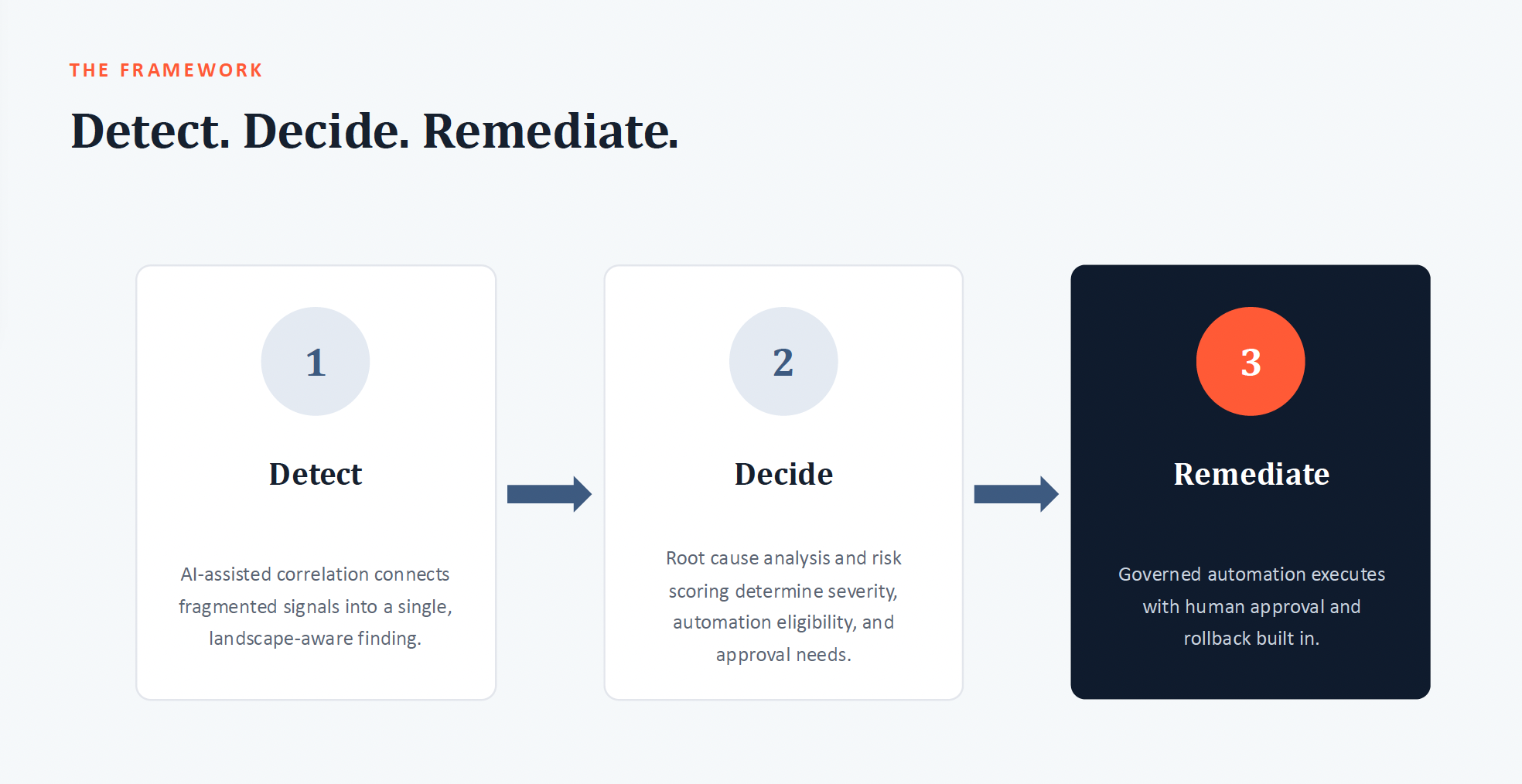
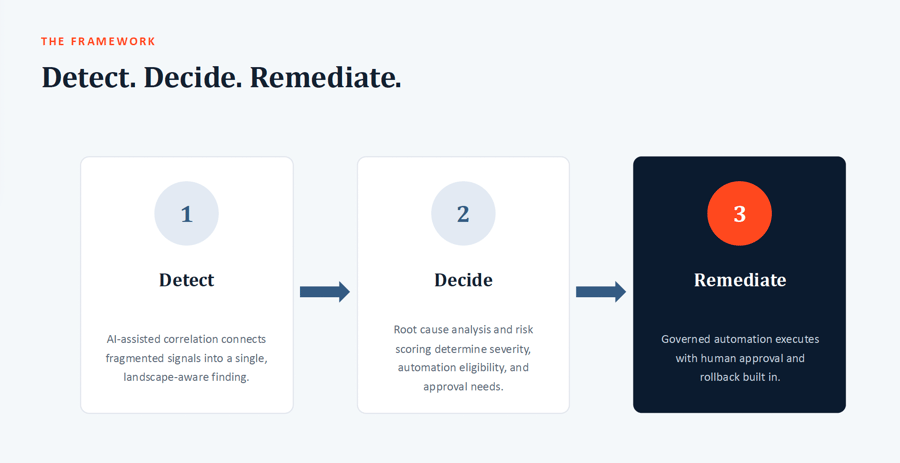 Figure 1: Detection > Decision > Remediation Framework
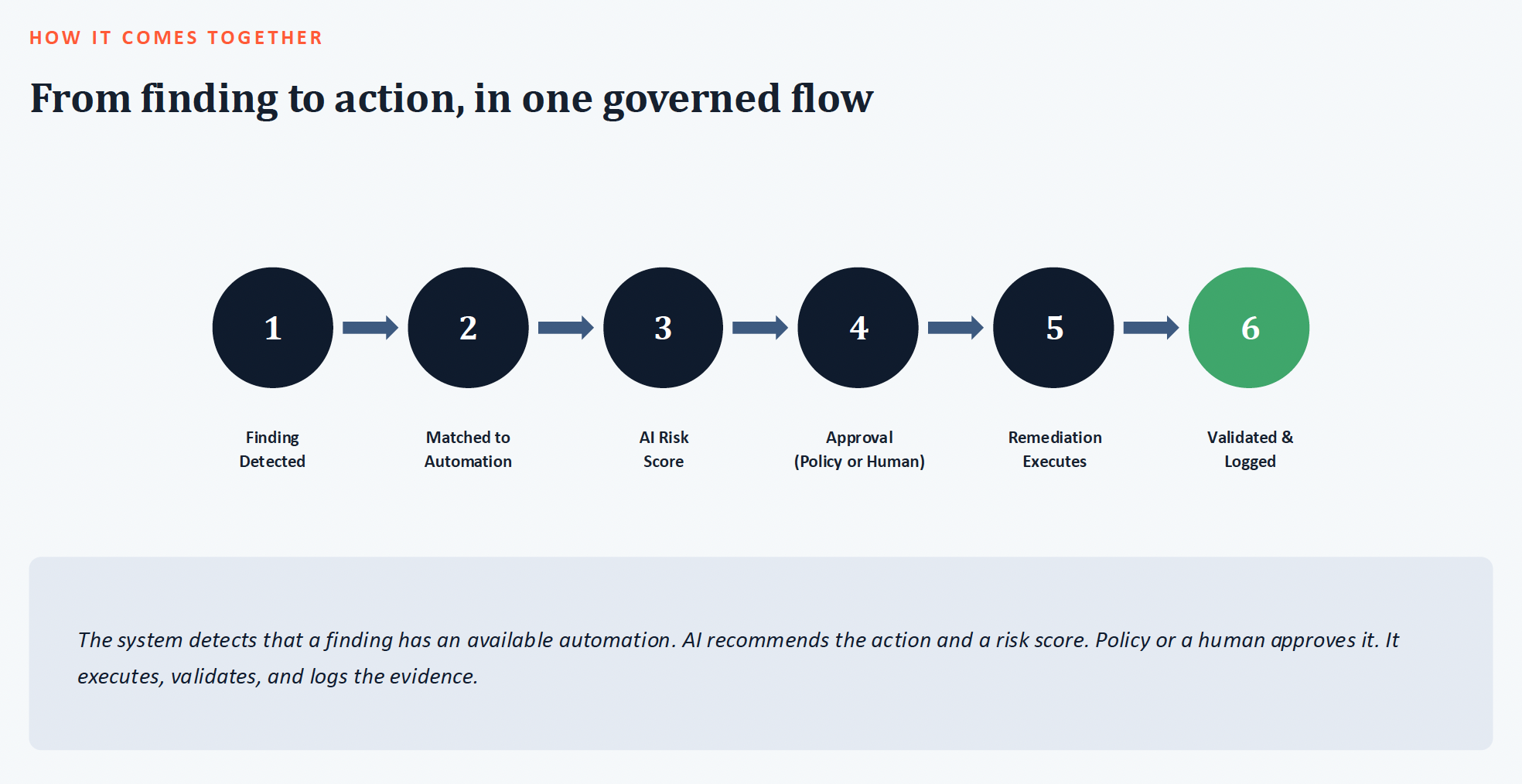
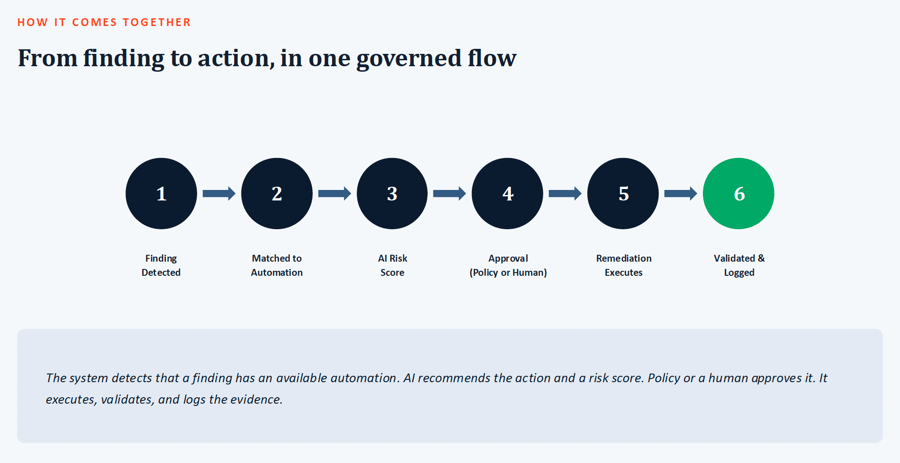 Figure 2: Detection > Decision > Remediation Operational Lifecycle
The webinar presented the framework as a six-step lifecycle:
- Detect the signal. Security signals can come from monitoring tools, vulnerability feeds, audit logs, SAP Security Notes, and other sources across the environment.
- Create and contextualize the finding. The signal is associated with the affected system so teams can determine whether it applies to their landscape and understand its potential impact.
- Analyze and prioritize the risk. Technical severity is evaluated alongside exploitability, business criticality, existing controls, and remediation requirements to determine what needs attention first.
- Route the decision through governance. The finding is assigned to the appropriate owner and, where necessary, routed through an approval workflow before remediation begins.
- Execute the remediation. A person, an automated workflow, or a combination of both carries out the required change, from applying SAP Notes and patches to changing configurations or moving transports.
- Validate and close the loop. Post-change checks confirm that the remediation was successful, reassess the remaining risk, and retain the evidence needed for compliance and audit.
This governed workflow is particularly important in SAP environments, where remediation can span security, Basis, infrastructure, application, and business teams. Clear ownership, approvals, automation, and validation help keep findings moving toward resolution instead of becoming stalled between teams.
Demonstrating the framework with SAP Patch Day
After establishing the framework, Linh demonstrated how IT-Conductor SecureOps applies it to SAP Patch Day. IT-Conductor connects vulnerability intelligence with the systems under management, including their SAP Notes, kernels, application stacks, and component versions. The analysis filters the broader set of published vulnerabilities to identify which findings apply to the systems within scope.
Maestro, IT-Conductor’s agentic AI layer, can use that context to analyze the findings and support the creation of remediation tickets. Each ticket tracks the affected security pillar and component, the risk, the responsible team, the required approval, and the action needed to resolve the issue.
For SAP Notes eligible for automation, the workflow can implement the correction in a development or sandbox environment and capture the resulting transport. IT-Conductor ChAI then moves the transport through the change lifecycle, routes approvals, and records the activity for audit purposes. Notes requiring manual work can follow the same governed process, giving teams a consistent lifecycle for automated and human-led remediation.
The demonstration also showed how teams can check the status of a specific SAP Note across multiple managed systems. A consolidated view indicates whether the Note is applicable, ready for implementation, already implemented, or obsolete after an upgrade. Teams gain a landscape-wide view of remediation progress without evaluating every system independently.
Extending the workflow beyond SAP Notes
The discussion then moved beyond the ABAP application layer. Operating systems (OS), databases, kernels, cloud services, third-party applications, and integrations can all introduce exposure. IT-Conductor can gather intelligence from SAP and external CVE sources, correlate it with the managed environment, and create the appropriate remediation work.
For an affected SAP kernel, the finding can connect directly to an existing patch automation. A centralized download process retrieves the required software from SAP and places it in a controlled repository, reducing the need to move installation files through individual desktops or remote connections. The service catalog then coordinates the patch, system stop and start activities, validation, and rollback across the targeted systems.
Linking findings to reusable automation changes the prioritization calculation. A high-risk kernel or OS vulnerability may require far less manual effort when the organization already has a tested remediation workflow. Teams can respond faster while applying a consistent process across multiple systems.
The second demonstration shifted the focus from vulnerability remediation to active threats in SAP security audit logs. High event volumes can make it difficult for an overwhelmed security team to distinguish isolated alerts from a coordinated attack. Conventional security platforms may also lack the SAP context needed to interpret the sequence correctly.
During the demonstration, an IT-Conductor security agent analyzed audit activity from a penetration test. It identified indicators of a brute-force attempt, privilege-related activity, and changes intended to reduce audit visibility. Correlating those events revealed a suspicious pattern that the individual alerts might not communicate on their own.
Active threats may require an immediate response once the platform completes its analysis. A governed automation can lock a privileged account, isolate a system, or initiate another containment action while the team investigates. Shortening the time between detection and containment reduces the opportunity for an attacker to move further through the environment.
Read Related Post: Managing SAP Security Remediation Activities with Agentic AI
Preserving an evidence chain for AI-assisted cyber operations
As the session moved from automated response to governance, Linh addressed the growing need to explain how AI participates in security decisions and actions. The presentation referenced the EU AI Act as one example of why organizations should preserve a clear and defensible record of AI-assisted operations.
Logs alone may not explain the complete sequence. A useful evidence chain identifies the objective, the data and systems an agent could access, the model and tools involved, the recommendation produced, the human approvals provided, the remediation executed, and the final validation outcome.
For SAP cyber operations, the evidence can connect a vulnerability or suspicious event to its risk analysis, ticket, approval, transport or automation, post-change validation, and updated security posture. Auditors and business leaders can then understand why the organization acted, how it governed the change, and whether the action reduced the intended risk.
Integrating SecureOps with existing ITSM tools
The webinar concluded with a question about integrating IT-Conductor with existing IT service management, messaging, and security platforms. Linh confirmed that IT-Conductor can connect with external workflows, including ServiceNow. Findings and remediation requirements can move into other ticketing queues, while external tickets can relate back to change activity in IT-Conductor.
He also emphasized the importance of preserving context across those integrations. Reducing a security finding to a few generic ticket fields can remove essential information about risk, system impact, ownership, approvals, and lifecycle status. Integrations should keep the remediation process moving while maintaining the information teams need to make and defend each decision.
Closing the loop in SAP cyber operations
The most important takeaway from the webinar is that identifying a security issue is only the beginning. SAP cyber resilience depends on how quickly teams can determine whether a finding matters to their environment, decide on the right response, and carry that decision through remediation, validation, and reassessment.
The Detect > Decide > Remediate framework provides a practical way to manage that process. Detection surfaces potential risks, decision-making adds the technical and business context needed to prioritize them, and remediation turns those decisions into governed action. Automation and agentic AI can accelerate repeatable work along the way, while human oversight remains part of the process when approvals, business context, or higher-risk changes require it.
Ultimately, the goal is to shorten the distance between a security finding and a verified fix without sacrificing governance. By making remediation more coordinated, measurable, and continuous, SAP teams can reduce backlogs faster and strengthen resilience as risks and environments continue to change.